
LangChain Deep Agents: Stop Stuffing Your System Prompt. Teach the Agent on Demand Instead. VII
Part 7: Your AI agent has three natural homes for its standing knowledge. Cram all three into the system prompt and you get a wall of instructions the agent rereads every turn. Here is how progressive

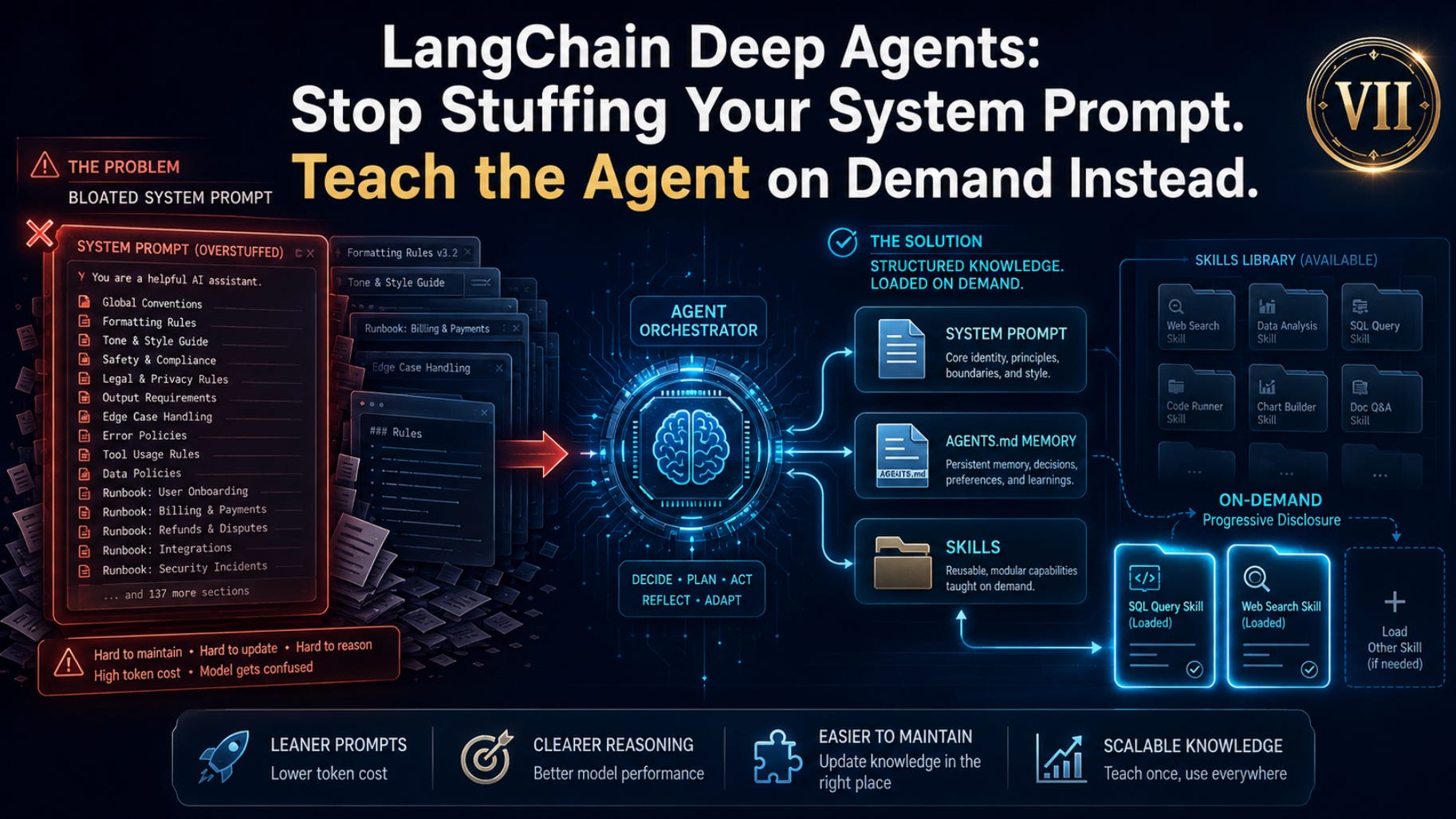
Your system prompt did not get bloated because you lacked discipline; it got bloated because it was doing three different jobs that never belonged in the same place. Deep Agents lets you stop making the agent reread every convention, memory, and runbook on every turn, and start teaching it only what it needs when the task actually calls for it.
In this article, you will learn the three distinct places a Deep Agent stores standing knowledge, the system prompt, memory files, and skills, and the simple decision rule for choosing among them. We cover how
AGENTS.mdmemory works, how progressive disclosure lets a project carry fifty skills without paying for fifty runbooks, the SDK-versus-CLI loading model that confuses everyone, and how skills flow to subagents. By the end, you will know exactly where each piece of knowledge belongs.
Part 7 of “Building with LangChain Deep Agents,” a 13-part guide to building production-ready AI agents.
Before we get into it, please consider subscribing to my Substack newsletter.
If this kind of practical, production-minded AI work is useful to you, a subscribe, like, comment, or share really helps grow the channel and supports the work.
Thank you for reading and helping these ideas reach more builders.
Your AI agent has three natural homes for its standing knowledge. Cram all three into the system prompt, and you get a wall of instructions that the agent has to reread at every turn. Here is how progressive disclosure fixes it.
Every system prompt starts clean. Then reality arrives. You add the coding conventions. Then the note about the flaky test module. Then the step-by-step for the release process, the formatting rules, the “always run pytest before claiming a fix” rule, and the API quirk that bit you last month.
Six weeks later, the system prompt is two thousand words nobody can read. The agent burns tokens, reciting them on every single turn. And you are still copy-pasting context into the chat because the prompt somehow doesn’t cover today’s task.
This is the wrong shape. Not all standing knowledge wants the same treatment. Some of it really is always relevant and belongs in the prompt. Some of it is task-specific and should load only when that task comes up. Deep Agents gives you three distinct mechanisms for getting knowledge into the agent, and the skill, pun intended, is knowing which one to reach for.
The headline idea is progressive disclosure: the agent learns which skills exist without paying to read them, then reads the full thing only when a task actually requires it. That single mechanism is what lets you stop stuffing the prompt.
Three places knowledge lives
Before any code, get the map straight, because the three blur together if you let them.
The system prompt is your direct instructions to the agent, plus the harness’s own built-in guidance about how to use its tools. It is always in context. It is the right home for the agent’s core role and behavior, the things that are true of every single turn.
Memory is the project context loaded from AGENTS.md files. Like the system prompt, it is always injected, every conversation, with no progressive disclosure. The difference from the system prompt is where it lives and what it is for. It lives on disk or in the backend, not hardcoded in your create_deep_agent call. It carries durable conventions and preferences that should survive across conversations without you having to restate them: project coding style, testing strategy, and architectural notes.
Skills are on-demand capabilities. The agent reads only the short description of each skill at startup, and pulls in the full instructions exclusively when a task matches. This is the home for knowledge that is large, specific, and only sometimes relevant: the detailed release runbook, the multi-step data-migration procedure, and the “how to debug this one gnarly subsystem” guide.
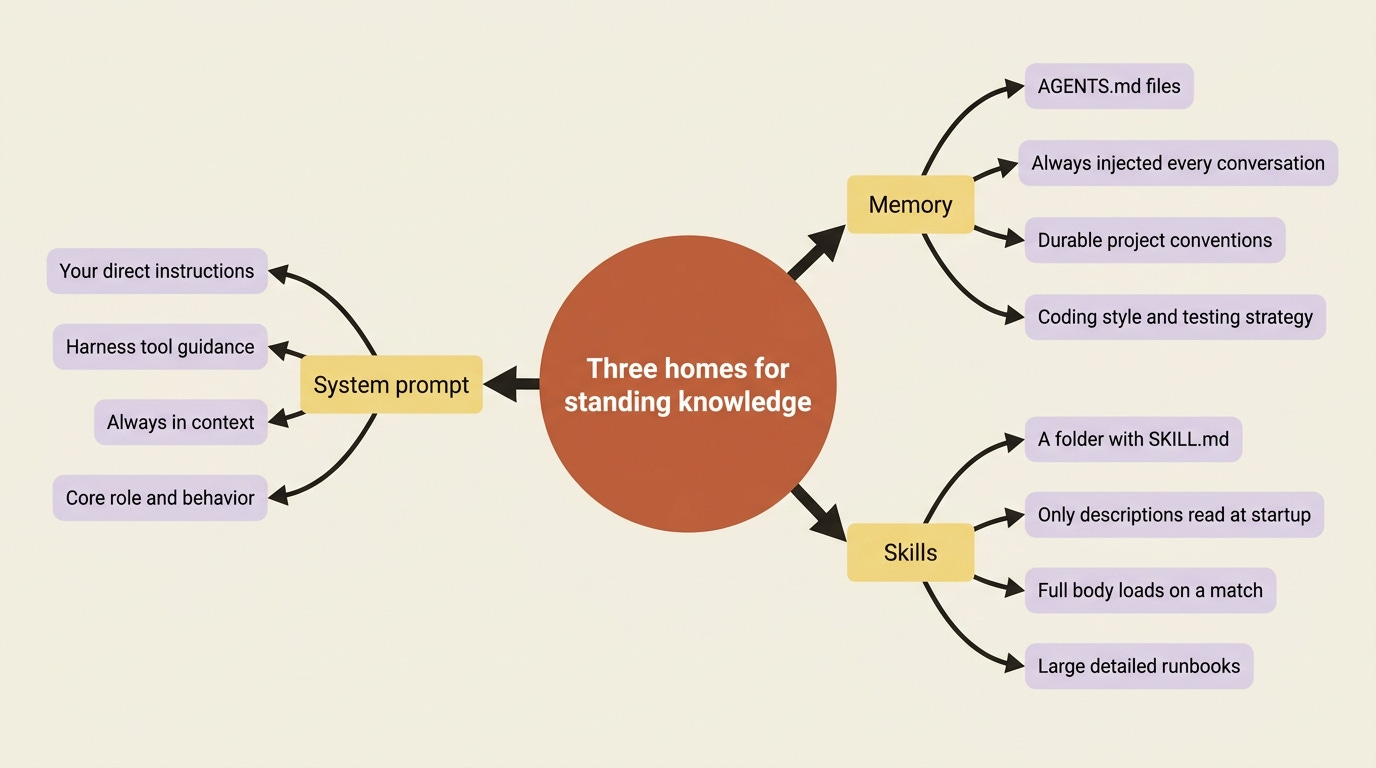
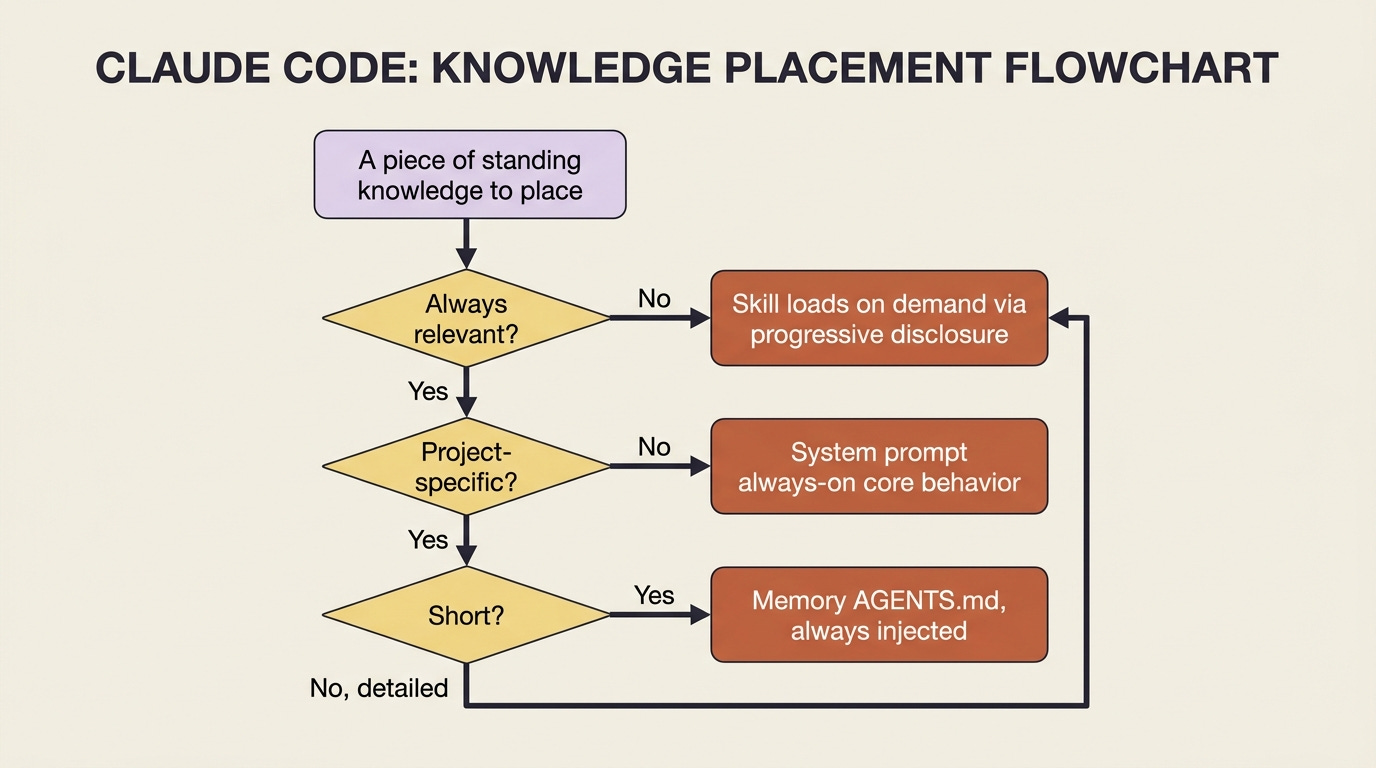
The decision rule is almost mechanical once you see the axis. Always relevant and short? System prompt. Always relevant and project-specific? Memory. Sometimes relevant, especially if detailed? Skill. The bloated prompt is what happens when “sometimes relevant and detailed” gets jammed into the always-on slot.
Memory: the context you stop repeating
Memory in Deep Agents uses AGENTS.md, the same open convention that other agent tools have adopted, meaning the file is just Markdown describing how to work in this project. You point the agent at one or more of them through the memory parameter:
from deepagents import create_deep_agent

agent = create_deep_agent(
    model=”anthropic:claude-sonnet-4-6”,
    memory=[”/project/AGENTS.md”],
)
The contents of /project/AGENTS.md get injected into the agent’s context at startup, every conversation, so the conventions written there are always in force without you pasting them into the chat. Write “this repo uses pytest, type hints are required, and the pagination module has historically been the source of off-by-one bugs” once, and the agent carries it into every session.
Two cautions ride along.
First, keep memory minimal. Because it is always loaded, every line you put in AGENTS.md is a line the agent reads on every turn forever. It has the same bloat failure mode as the system prompt if you overstuff it. Detailed procedures belong in skills, not memory.
Second, and this matters for safety, prefer that memory be written by your application code rather than freely by the agent, especially any memory shared across users. Shared writable memory is a channel an attacker can use to plant instructions that one user’s agent will later read. The defense is a permission rule denying writes to the memory path: load AGENTS.md as context, the agent reads, and keep the pen in your hands.
Skills: expertise that loads itself
Skills are the part worth slowing down on, because progressive disclosure is the idea that makes the whole “stop stuffing the prompt” thesis work.
A skill is a folder. At a minimum, it contains a SKILL.md file, and it can carry extra scripts, reference docs, or templates alongside it. The SKILL.md opens with YAML frontmatter, just a name and a description, followed by the actual instructions in Markdown:
---
name: run-and-fix-tests
description: Use when asked to fix a failing test in the buggy-shop repo. Covers running pytest, reading failures, and verifying a fix.
---

To fix a failing test in this repo:

1. Run the suite with `pytest -x` to stop at the first failure.
2. Read the traceback and locate the failing assertion.
3. ... (full procedure here)
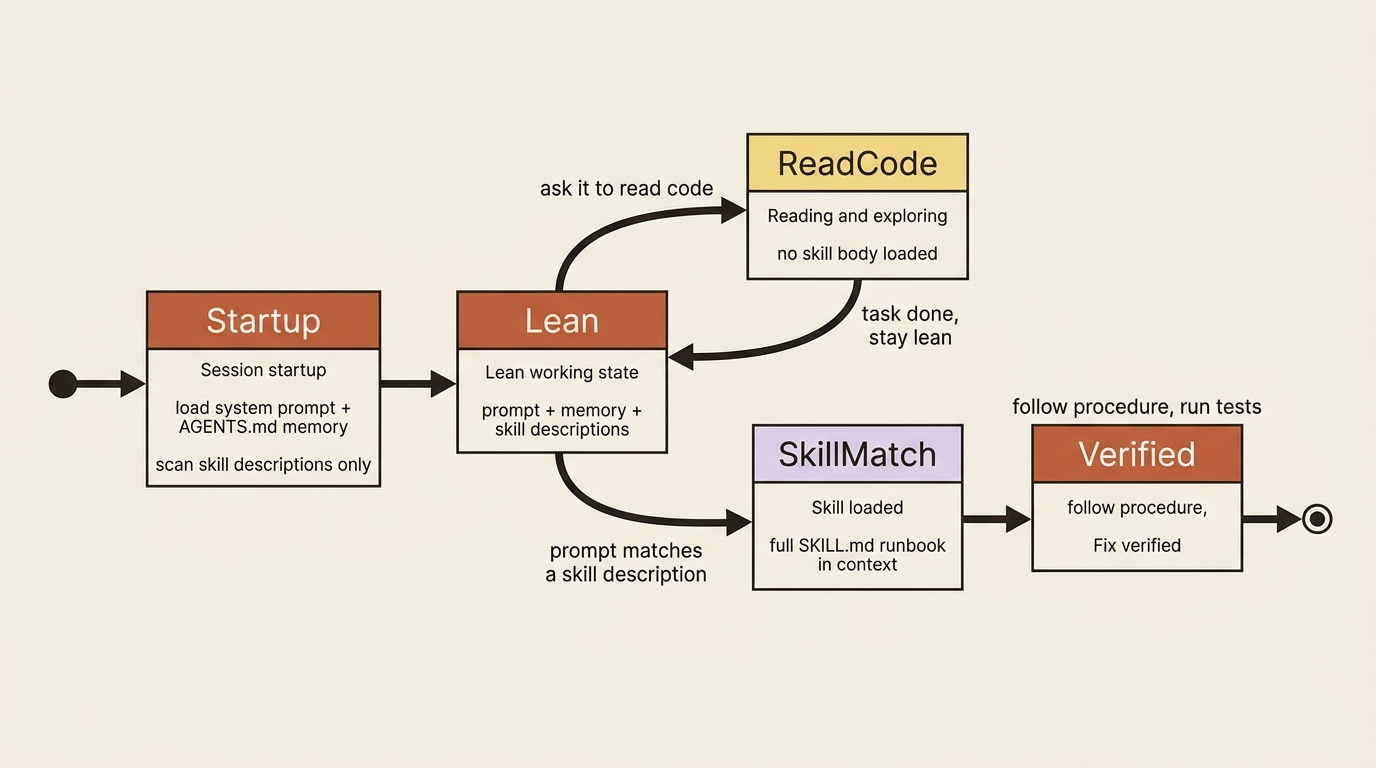
Here is the mechanism that matters. At startup, the agent reads only the front matter, the name, and the description of each skill. That is cheap: a sentence per skill, not the whole runbook. Then, when a prompt arrives, the agent checks those descriptions against the task. Only if one matches does it open the full SKILL.md and follow it.
So a project can have fifty skills, and the agent pays, per turn, for fifty-one-line descriptions plus the full text of the one or two it actually uses. That is progressive disclosure, and it is why skills scale, where a fat system prompt does not.
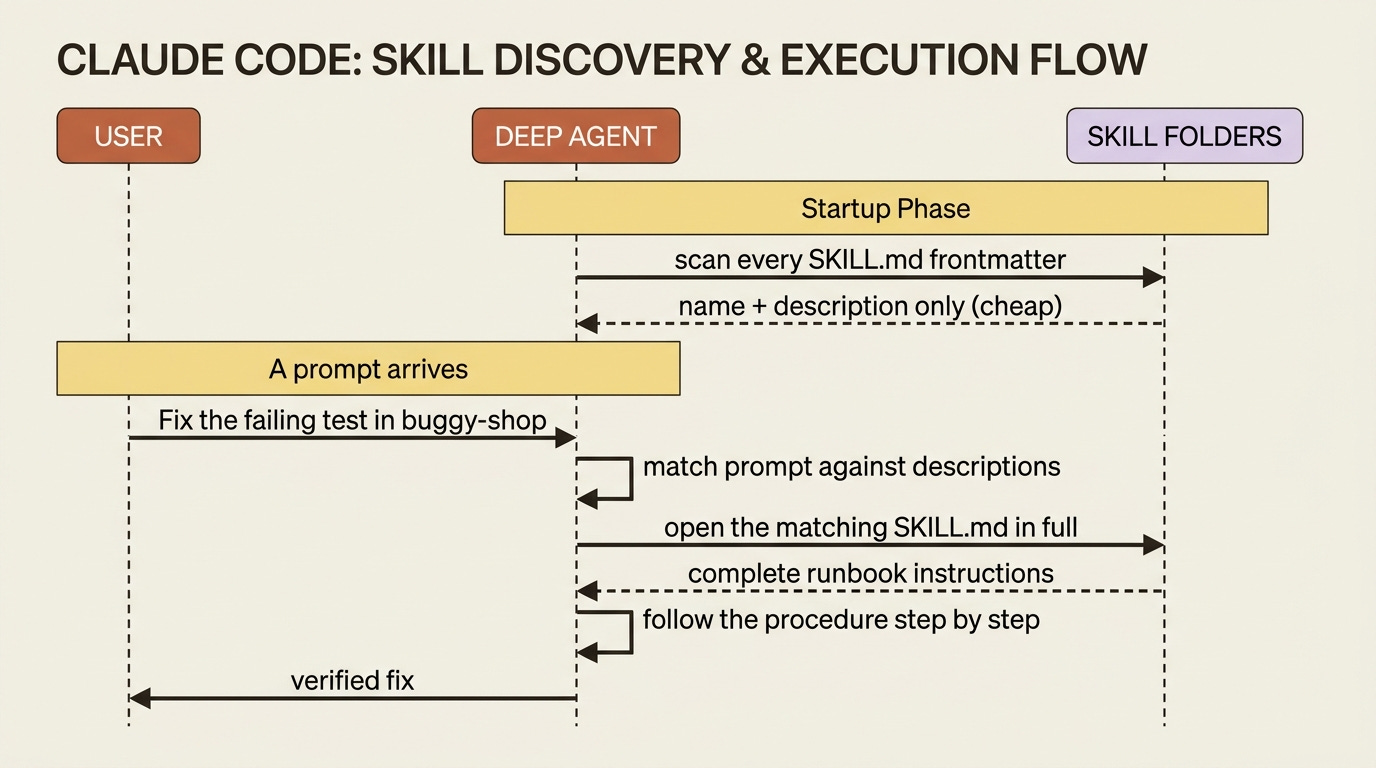
This puts real weight on the description field. It is the only thing the agent sees when deciding whether a skill is relevant, so a vague description means the skill never fires when it should, or fires when it should not. Write the description as a precise trigger: when to use this, and on what kind of task. “Use when asked to fix a failing test in the buggy-shop repo,” tells the agent exactly when to reach for it.
Loading skills in the SDK, and the CLI distinction that confuses everyone
You attach skills with the skills parameter, a list of source paths relative to the backend’s root:
agent = create_deep_agent(
    model=”anthropic:claude-sonnet-4-6”,
    skills=[”/skills/”],
)
There is one wrinkle specific to the default StateBackend that trips up everyone the first time. Because StateBackend is a virtual in-state filesystem, the skill files do not exist on disk anywhere the agent can see. You have to put them into that virtual filesystem when you invoke. You do that with the files argument, using a helper to format the contents:
from deepagents.backends.utils import create_file_data  # ①

skill_md = “”“---
name: run-and-fix-tests
description: Use when asked to fix a failing test in the buggy-shop repo.
---
... full instructions ...
“”“  # ②

result = agent.invoke(
    {
        “messages”: [{”role”: “user”, “content”: “Fix the failing test in buggy-shop.”}],  # ③
        “files”: {”/skills/run-and-fix-tests/SKILL.md”: create_file_data(skill_md)},  # ④
    },
    config={”configurable”: {”thread_id”: “fix-1”}},  # ⑤
)
① The helper formats raw text into the file-data shape the virtual StateBackend filesystem expects. ② The skill is just a string here, the same SKILL.md frontmatter plus body you saw above. ③ The user message is the task; its wording is what the agent matches against each skill’s description. ④ The files argument seeds the skill into the virtual filesystem at the path skills=["/skills/"] points at, so the agent can find and read it on this run. ⑤ The thread_id scopes the conversation, the seeded files and all, to one resumable thread.
If you are a paid subscriber, thank you. Your support makes this work possible.
If you are a free subscriber and find these articles useful, please consider upgrading. A paid subscription is $80 per year or $8 per month.
Free subscribers typically receive access to the full versions of paid articles after one to two months.
Note: The full extracted listing at code/langchain_deepagents/part-7-context-skills-memory/listings/01-seed-skill-into-state-backend.py shows the runnable form.
You seeded the skill file into the agent’s virtual filesystem at the path skills=["/skills/"] points at, and on this invocation, the agent saw a matching task, read the skill, and followed it. With a FilesystemBackend instead, the skills would simply load from disk relative to the backend root, and you would skip the seeding step.
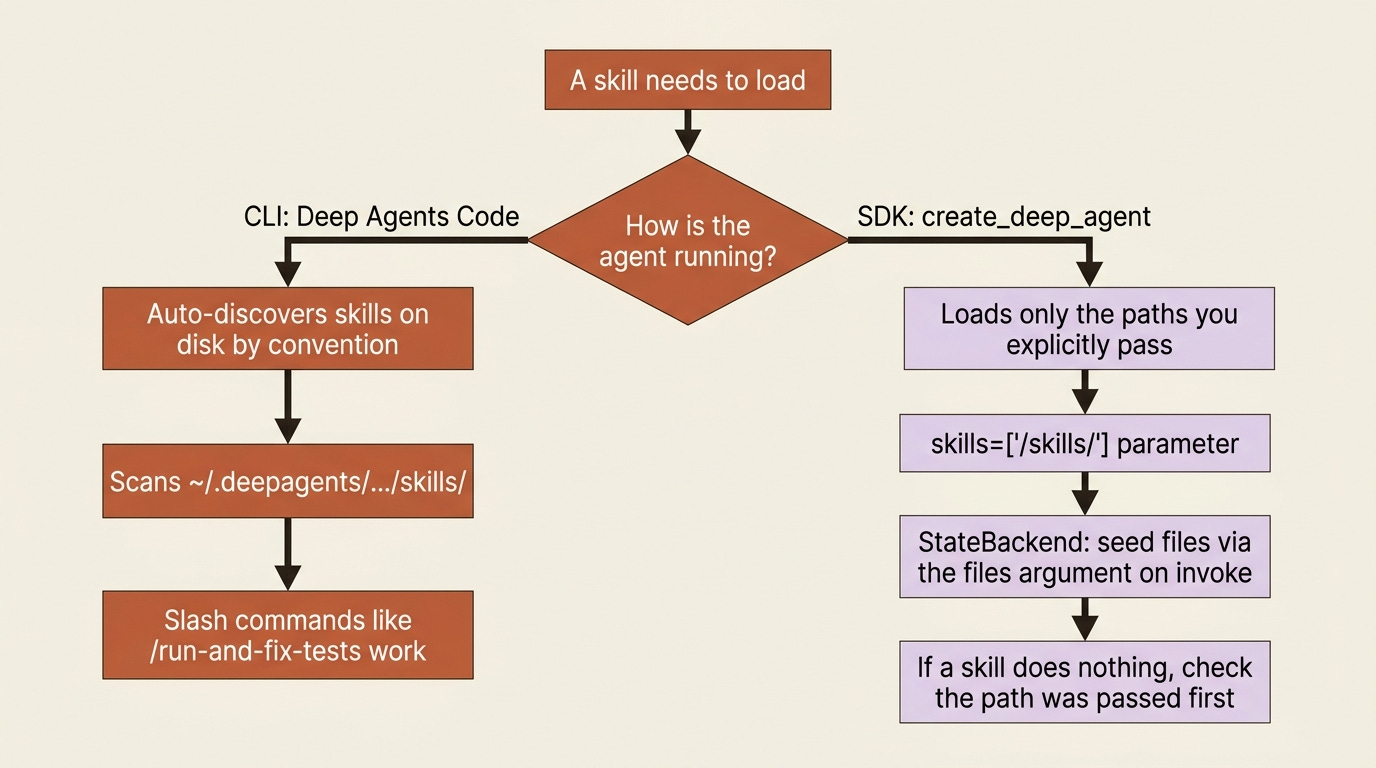
The gotcha: the SDK loads only the skill sources you explicitly pass. It does not scan the directories the command-line tool uses, like ~/.deepagents/.../skills/. This is the single most confusing point about skills, because Deep Agents Code, the CLI, does scan those directories automatically, and slash-command invocation like /run-and-fix-tests is also a CLI feature.
So a skill that “just works” when a colleague uses the CLI will appear to do nothing in your SDK code until you pass its path in skills. They are two different loading models: the CLI discovers skills on disk by convention, and the SDK loads exactly what you hand it. If your SDK agent ignores a skill, check that you actually passed its source path before you debug anything else.
Skills and subagents do not share by default
A short but important rule. Skills do not automatically flow to every subagent.
The built-in general-purpose subagent does inherit whatever you passed to the main agent’s skills. But a custom subagent you define yourself starts with no skills unless you give it its own skills list in its definition. Its skill state is fully isolated: the parent cannot see the subagent’s skills, and vice versa.
This is usually what you want, because a specialized subagent should have a focused, separate toolkit, but it is a surprise if you assumed inheritance. A reviewer subagent will need its own skills handed to it deliberately.
Wiring it into a real agent
This composes cleanly. Picture a code-maintenance agent working in a buggy-shop repository.
It gets an AGENTS.md in memory carrying the always-true facts: the repo uses pytest, type hints are required, and fixes are not done until the suite is green. That is short, always relevant, and now permanent.
Then it gets the run-and-fix-tests skill from above, which holds the detailed multi-step procedure for actually diagnosing and verifying a fix. Most conversations with the agent will never load that skill, because you might just be asking it to read code. Its full text stays out of context until you ask for a fix, at which point the description matches and the runbook loads. Lean prompt, deep expertise on tap.
The agent also has a durable /memories/ route, so as it works it can record what it learns there for next time, the long-term complement to the static AGENTS.md you wrote by hand.
Do this today
Run
/contextthinking on your worst system prompt. Find the lines that are detailed and only sometimes relevant. Those are skills waiting to be extracted.Move durable conventions into an
AGENTS.md. Repo coding style, testing strategy, and known-fragile modules. Pass it through thememoryparameter and stop re-stating it.Extract one runbook into a skill. Pick your most detailed procedure, write a
SKILL.mdwith a precise trigger description, and pass its path in theskillsparameter.If a skill is not firing, check the path first. The SDK loads only what you hand it. A skill that works in the CLI does nothing in SDK code until you pass its source path.
Deny writes to your memory path. Keep the agent from quietly rewriting its own standing instructions, especially when memory is shared across users.
Where this leaves you
You now have a real answer to the bloated-prompt problem. Three slots, one decision axis: always-on short instructions go in the system prompt, always-on project context goes in memory via AGENTS.md, and sometimes-relevant detailed expertise goes in skills that load themselves through progressive disclosure.
The system prompt was never meant to hold everything. It became a wall of text because it was the only slot you knew about. Once you see all three homes, the bloat is not a discipline problem. It is a routing problem, and routing has a simple rule.
Stop making the agent reread your release runbook on every turn. Teach it on demand instead.
This is Part 7 of “Building with LangChain Deep Agents,” a 13-part guide to building production-ready AI agents.
If this helped you, please consider subscribing to my Substack newsletter.
Likes, comments, and shares really do make a difference. They help grow the channel, support the work, and get these ideas in front of more builders who are trying to understand AI agents, harness engineering, and production AI systems.
Thank you for reading and for helping the work reach more people.
About the Author — Claude Certified Architect
Rick Hightower is a former Senior Distinguished Engineer at a Fortune 100 company, focusing on delivering ML / AI insights to front-line applications, and a practitioner building multi-agent production systems. Follow him on SubStack and Medium for more hands-on agent engineering content. You can also book him to speak and train your team: Check out Rick Hightower’s SpeakerHub.

Rick Hightower helps companies become AI-first through practical mentoring, executive and team training, and custom AI solution development. He is a former Senior Distinguished Engineer at a Fortune 100 company, where he focused on bringing ML and AI insights into real front-line business applications.
Subscribe to Rick’s newsletter to see videos and guides.
Rick is a Claude Certified Architect, AI systems practitioner, and builder of production multi-agent systems. He is currently working on authoring a book on Harness Engineering with Manning Publishing. He created Skilz, a universal agent skill installer supporting 30+ coding agents, including Claude Code, Gemini, Copilot, and Cursor, and co-founded one of the largest agentic skill marketplaces.
Today, Rick and the Spillwave team work with leaders and teams who want to move beyond AI experiments and build real AI capability inside their companies. He helps organizations adopt AI safely, train their people, redesign workflows, and build practical AI systems that create measurable business value.
Ready to make your company AI-first? Connect with Rick on LinkedIn, Substack, or Medium, book him to speak or train your team, or visit Spillwave to explore mentoring, training, and custom AI solutions for your organization.