
CrewAI: Remembering versus Knowing: How CrewAI Memory and Knowledge Work - VI
Part 6: CrewAI ships with Knowledge, Memory and RagTools

Watching a capable agent rediscover the same fact run after run is annoying and inefficient. This happens because nothing told the agent crew what it should already know. CrewAI ships two systems that sound similar but are not. One is what your agents pick up or learn across runs. The other is what they already know to do their job. Confusing the two is a common mistake for beginner CrewAI developers.
In this article, you will learn the difference between CrewAI memory and knowledge. Knowing when to use each tool is key. You'll also learn about
RagToolfor searching a large corpus of your project's knowledge that won't fit into the LLM’s working memory. Then we cover the unifiedMemoryclass and the four places it plugs in. We cover the one knob worth tuning early, the gotcha that breaks file-based knowledge sources that trips up almost everyone. And lastly, a worked mapping onto a real crew so the distinction stops being academic.
Part 6 of “Building with CrewAI,” an eleven-part guide that takes a developer from zero to a hardened, observable, production-deployed multi-agent system.
CrewAI ships with Knowledge, Memory, and RagTools. Memory is what your agents learn after a run. Knowledge is the agents' instructions and facts they need to do their job correctly. RagTools is for searching a large corpus of knowledge. Don’t make the mistake of confusing these, because each has a purpose.
Every time you use CrewAI, you start up a crew, but the crew doesn’t remember anything from the time before. It forgets. It’s like a goldfish, a goldfish with severe ADHD. Every run starts from nothing. No recollection of what happened. If it fixed the bug from last week and you ask it to fix it again, you might remember that bug. It certainly does not. If you have a coding convention that everyone follows and you want CrewAI to use it, it has no recollection of that either. It just doesn’t know. It might guess, but that’s all it’s doing. It’s guessing. Some people might call that guess a hallucination, because without grounding, that’s all it is.
You use it, and you see it rediscovering the same facts as if those previous conversations, those previous runs, never happened. Now, it’s extremely smart, but it has to re-derive. It has to come up with everything again. It is the absent-minded professor on steroids.
You want memory that accumulates over runs. You want memory to build a knowledge base of what you’ve done before. You want it to remember things instead of just knowing things, or trying to rediscover them. CrewAI splits this into two systems. Memory is what the crew accumulates over time, over multiple runs. When you make a decision, it learns that decision. Knowledge is what you give it: the instructions, the skills, ahead of time. These are the things you pass to it so that it knows your conventions and facts. This is remembering versus knowing.
If you don’t pick the right type, the agent can either reread the manual it didn’t need anyway, or forget the lesson it learned in the last run. You have to reach for the right type of memory for your crew. And then your crew will feel like a teammate that’s been around for a while, instead of a character from the movie Memento.
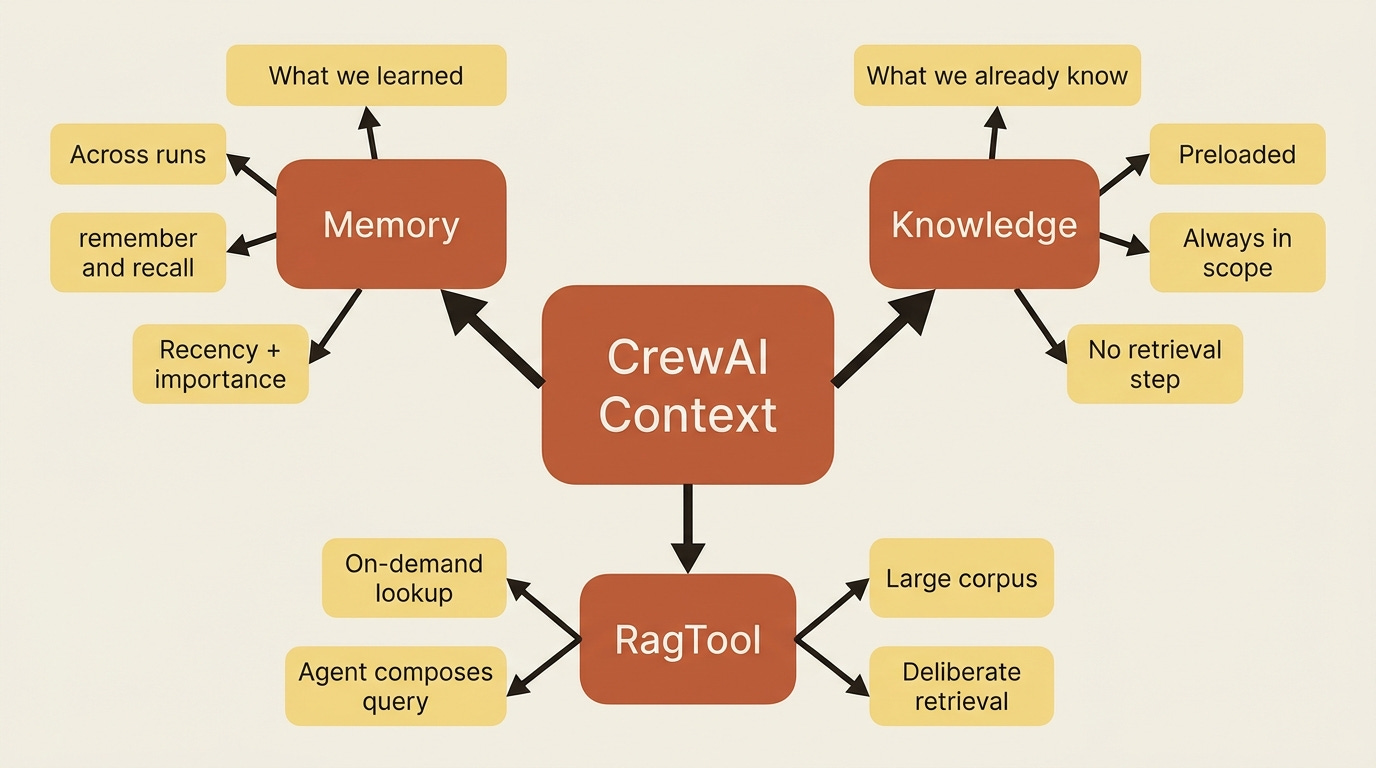
Memory: what the crew carries forward
CrewAI has a unified memory class. CrewAI’s memory is called Memory. It used to be that CrewAI had short-term memory, long-term memory, entity memory, and you may still see some of those in the CLI or in some of the older documentation. Try to forget. Pun intended.
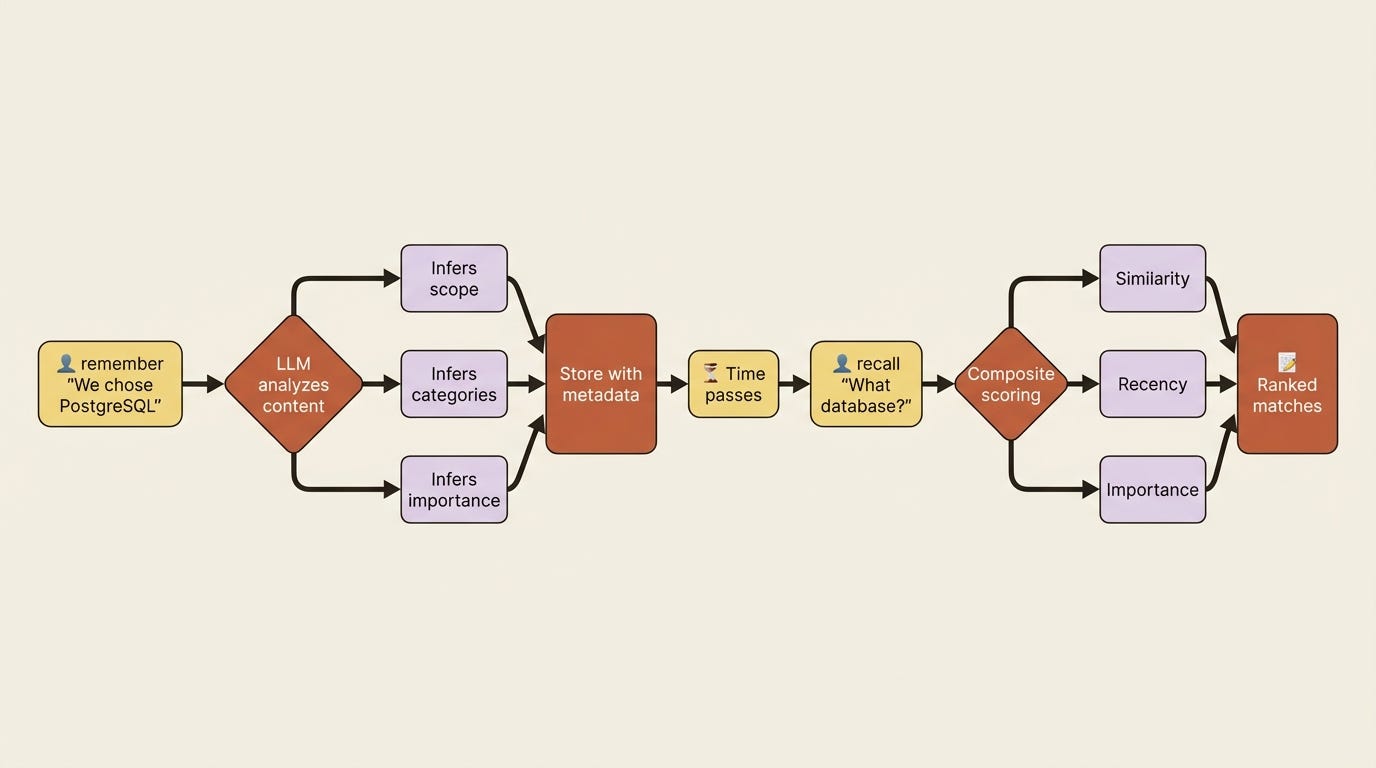
The modern API is more intelligent and quite automatic. When you give it something new, the LLM will analyze and classify that new data and knowledge, and decide where it belongs and what categories it touches. And when it has to look that up later, it’s not just ranked by similarity search; it’s also ranked by the item's recency and importance and how it fits the current work.
There’s a method called remember, and that’s when the LLM infers scope and categories. Then there’s recall, and that’s when you look up memories ranked by vector similarity blended with recency and importance. So it does an LLM analysis on the way in, so that it can find the most relevant memories on the way out, when it needs them.
At its simplest, it reads like a notebook.
This snippet does both halves of the loop. It writes one fact in, then asks a question and prints the ranked answers back out.
from crewai import Memory

memory = Memory()
memory.remember(“We decided to use PostgreSQL for the user database.”)  # ①

matches = memory.recall(“What database did we choose?”)  # ②
for m in matches:
    print(f”[{m.score:.2f}] {m.record.content}”)  # ③
① remember is the write side: the LLM analyzes the content as it saves, inferring scope, categories, and importance for you.
② recall is the read side: it returns matches ranked by similarity blended with recency and importance, not raw similarity alone.
③ Each match carries a score and the stored record, so the best answer surfaces first.
Note: The full extracted listing at code/crewai/part-6-memory-and-knowledge/listings/01-memory-notebook.py shows the parts elided here.
You did not tell it a category or a scope or an importance. The LLM inferred all three.
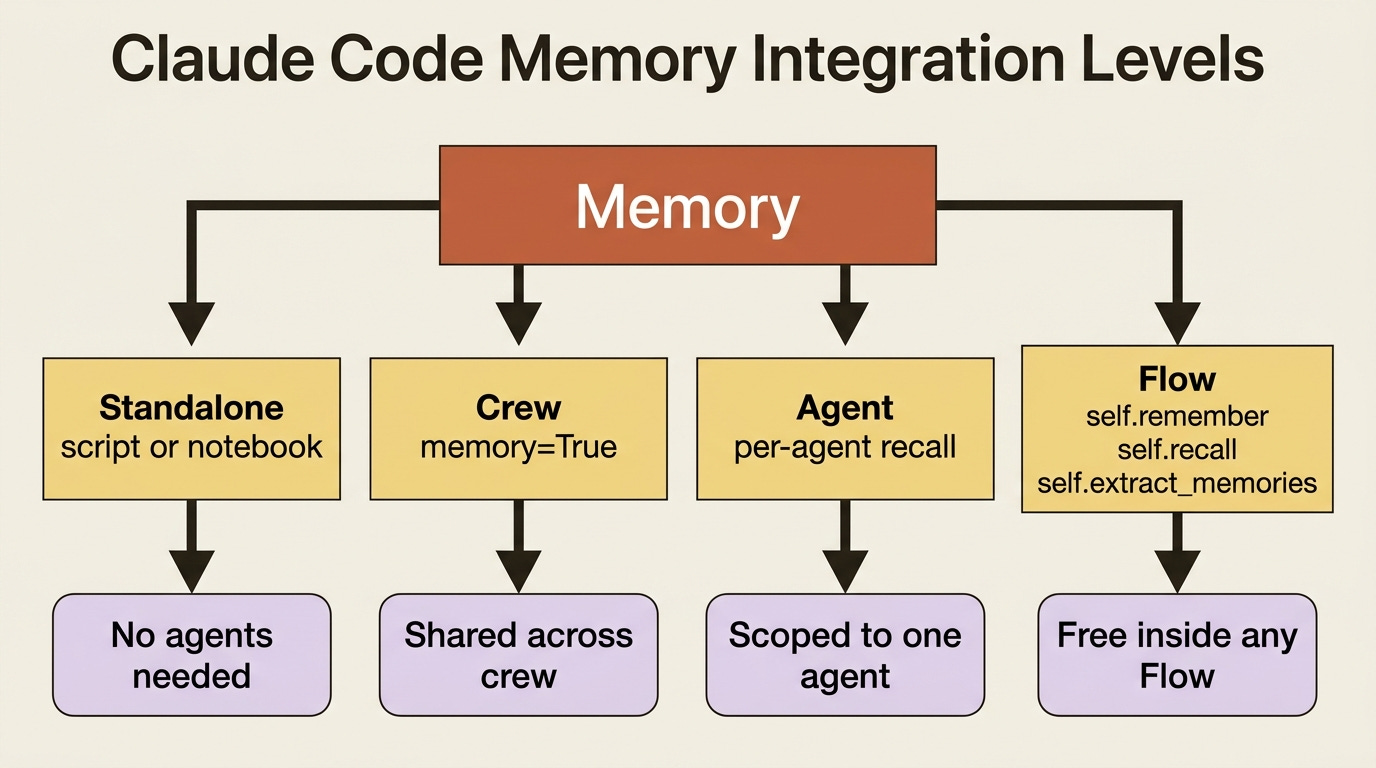
Four ways to plug it in
Memory’s really easy to set up. You can use it standalone, as above. With a Crew, you just pass memory=True when you initialize it, and this will create a memory with sensible defaults, or you pass a configured Memory instance for control. You can use it with an Agent when an agent should carry its own memory. And you can also use it inside of a Flow, where every Flow gets a self.remember(), a self.recall(), and a self.extract_memories() for free.
The Crew case is the one you reach for most.
from crewai import Crew, Process

crew = Crew(
    agents=self.agents,
    tasks=self.tasks,
    process=Process.sequential,
    memory=True,   # the crew now remembers across runs
)
Just that one flag is the difference between starting fresh every time and creating a crew that builds on what it’s seen before.
The one knob worth knowing now
When recall is looking things up, it doesn’t just go by similarity; it also takes into account the recency of the memory. And you can dial this forward or backward using recency_weight. If you have a project that does a lot of things in a single day and last week doesn’t matter, you dial it to a short half-life. If it’s a slower architecture where you need to remember what happened a couple weeks ago, you dial it the opposite direction. It’s like a tuning knob.
# A sprint that churns: favor what’s recent.
memory = Memory(recency_weight=0.5, recency_half_life_days=7)

# An architecture reference: favor what’s important, let age barely matter.
memory = Memory(recency_weight=0.1, recency_half_life_days=180)
You do not need to tune this on day one. It is enough to know the memory is not naive. It has recency baked in, so it’s not just a similarity search. Old memories basically decay and go away.
If you are a paid subscriber, thank you. Your support makes this work possible.
If you are a free subscriber and find these articles useful, please consider upgrading. A paid subscription is $80 per year or $8 per month.
