
Claude Managed Agents VI: Your Agent Lives in a Box. MCP Is How It Reaches Your Billing System.
Part 6: Custom tools make the agent ask your code for data; MCP lets it call your real services directly, and the interesting part is what happens when one of those services goes down.

Your Agent Lives in a Box. MCP Is How It Reaches Your Billing System.
Custom tools make the agent ask your code for data; MCP lets it call your real services directly, and the interesting part is what happens when one of those services goes down.
Custom tools let an agent ask your code for data. The Model Context Protocol lets it call your real services directly, on its own. Here is how to wire a remote server in, scope which tools it can touch, and survive a server that dies mid-session.
In this article, you will learn how to connect a Claude Managed Agent to an external service over the Model Context Protocol. We cover the two-part declaration that the API enforces, how to scope which server tools the agent may use, why MCP tools ask for confirmation by default, and the failure modes that arrive the moment your agent depends on a service the harness does not control. By the end, you can hand an agent a live connection to your internal systems without the integration becoming a single point of collapse.
Part 6 of the Claude Managed Agents Series
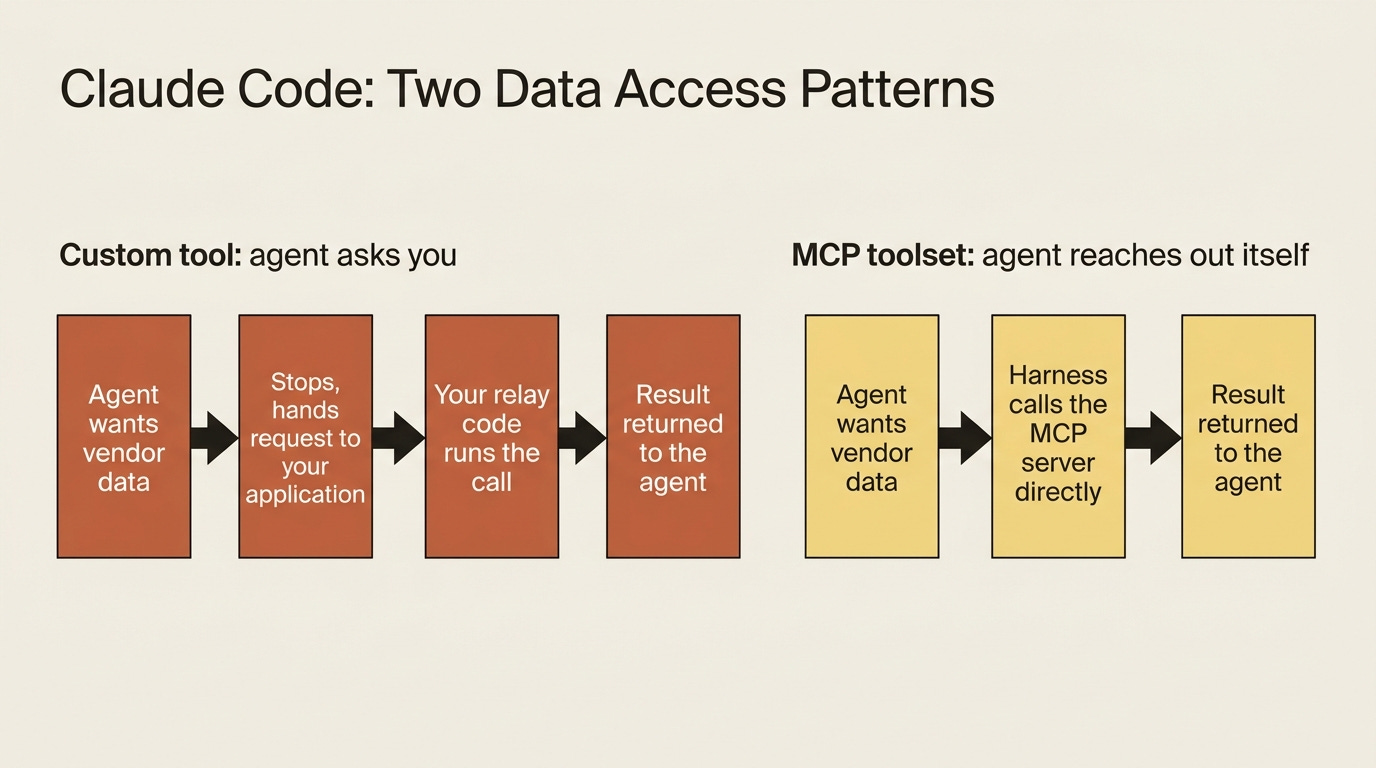
Give an agent a custom tool and watch what actually happens. The agent wants vendor data. It stops, hands your application a structured request, and waits. Your code receives the request, runs the lookup, and sends the answer back. For one tool, that is a clean contract. For an internal billing system with a dozen operations, reading vendors, fetching payment terms, posting reconciliation results, and querying tax records, you are now writing and maintaining a relay function for every single call. That is the exact plumbing an agent framework was supposed to delete.
The Model Context Protocol is the better answer. MCP is a standard way to expose a set of tools over an HTTP endpoint, and Managed Agents speaks it natively. You point the agent at your billing system’s MCP server once, and from then on the agent calls any tool that server exposes directly. The harness executes the call. There is no per-call relay in your code at all.
The distinction is worth holding onto. A custom tool is the agent asking you for something. An MCP tool is the agent reaching out and getting it itself. This article wires a working agent into a real service over MCP, scopes what it is allowed to do there, and then deals honestly with the new failure modes that come with depending on something the harness cannot guarantee.
Code below is shown in Python and TypeScript.
Declaration is two halves that must agree
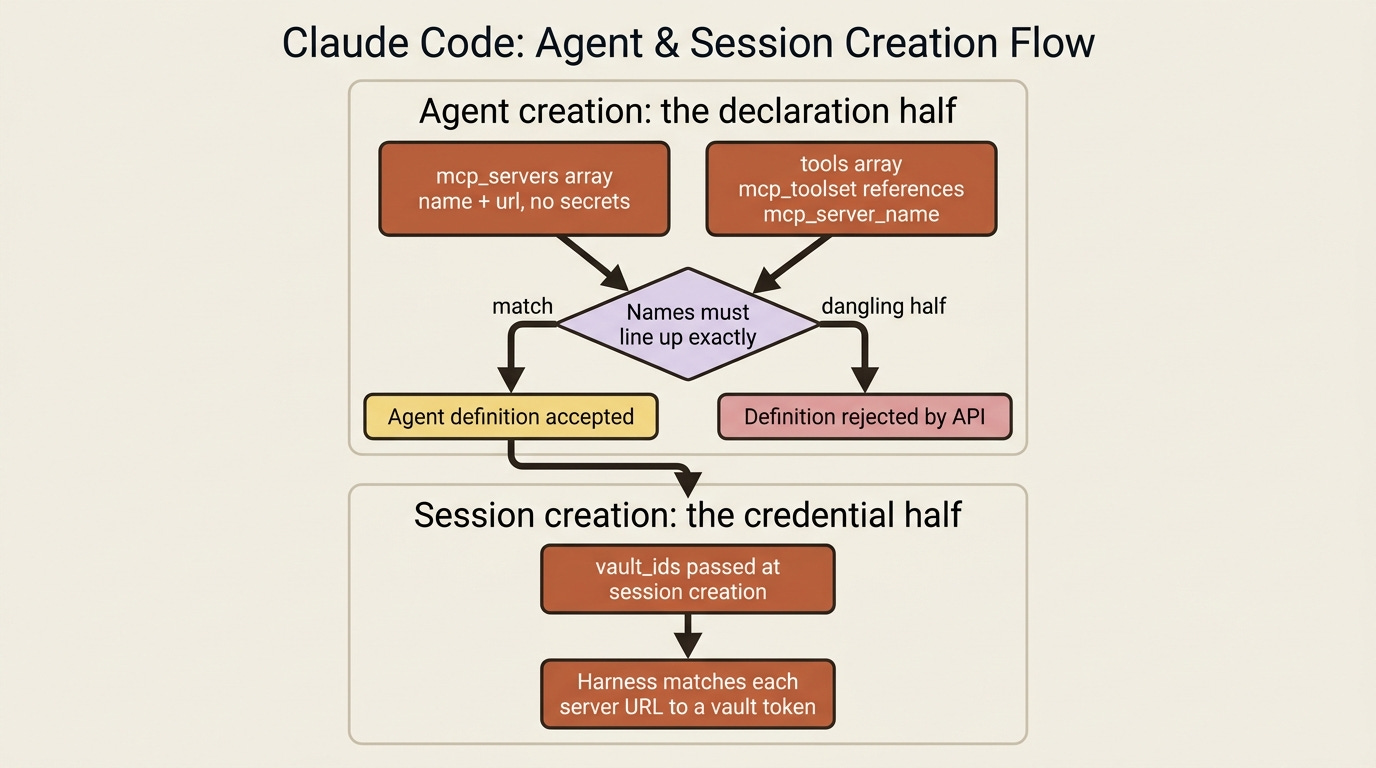
MCP setup deliberately splits across two moments in an agent’s lifecycle. At agent creation you declare which servers exist, naming them and giving their URLs, with no secrets involved. At session creation you supply the credentials by referencing a vault. That separation is not bureaucracy. It keeps tokens out of your reusable agent definitions, so one agent definition can run for many different users, each with their own credentials.
This article is the declaration half. You declare servers in two places, and the two places have to line up. The mcp_servers array names each server and gives its URL. The tools array adds an mcp_toolset entry that references that server by name. The toolset entry is what actually exposes the server’s tools to the agent. Here is an invoice-reconciliation agent pointed at an internal billing system, in Python:
agent = client.beta.agents.create(
    name="Invoice Reconciler",
    model="claude-opus-4-7",
    system=(
        "You are an invoice-reconciliation agent. Use the billing system's tools "
        "to fetch canonical vendor and ledger data rather than trusting values "
        "printed on invoices."
    ),
    mcp_servers=[
        {
            "type": "url",
            "name": "billing",
            "url": "https://mcp.internal.example.com/billing",
        },
    ],
    tools=[
        {"type": "agent_toolset_20260401"},
        {"type": "mcp_toolset", "mcp_server_name": "billing"},
    ],
)
And in TypeScript:
const agent = await client.beta.agents.create({
  name: "Invoice Reconciler",
  model: "claude-opus-4-7",
  system:
    "You are an invoice-reconciliation agent. Use the billing system's tools to " +
    "fetch canonical vendor and ledger data rather than trusting values printed on invoices.",
  mcp_servers: [
    { type: "url", name: "billing", url: "https://mcp.internal.example.com/billing" },
  ],
  tools: [
    { type: "agent_toolset_20260401" },
    { type: "mcp_toolset", mcp_server_name: "billing" },
  ],
});
The name field is the thread that ties the two halves together. You called the server billing in mcp_servers, and the mcp_toolset references it as mcp_server_name: "billing". That same name shows up on every MCP tool event in the stream, so when you see agent.mcp_tool_use go by, you know exactly which server it came from. The type is always "url", since these are remote servers reached over HTTP.
Here is the gotcha, and the API enforces it strictly. The two halves must agree exactly. Every server you declare in mcp_servers must be referenced by an mcp_toolset, and every mcp_toolset must point at a declared server. Declare a server and forget to add its toolset, or reference a server name you never declared, and the agent definition is rejected outright. There are no dangling halves. If agent creation fails with a complaint about MCP configuration, this mismatch is almost always the reason. One more limit: an agent can declare up to 20 MCP servers, and their names must be unique within that agent.
If you are a paid subscriber, thank you. Your support makes this work possible.
If you are a free subscriber and find these articles useful, please consider upgrading. A paid subscription is $80 per year or $8 per month.
