
Claude Managed Agents: The Agent Cannot Call Your Database. Custom Tools Are How You Hand It Back -- IV
Part 4: Built-in agent tools run server-side and you never touch them; custom tools invert that completely, and understanding the request-result handshake is what connects a managed agent to your own

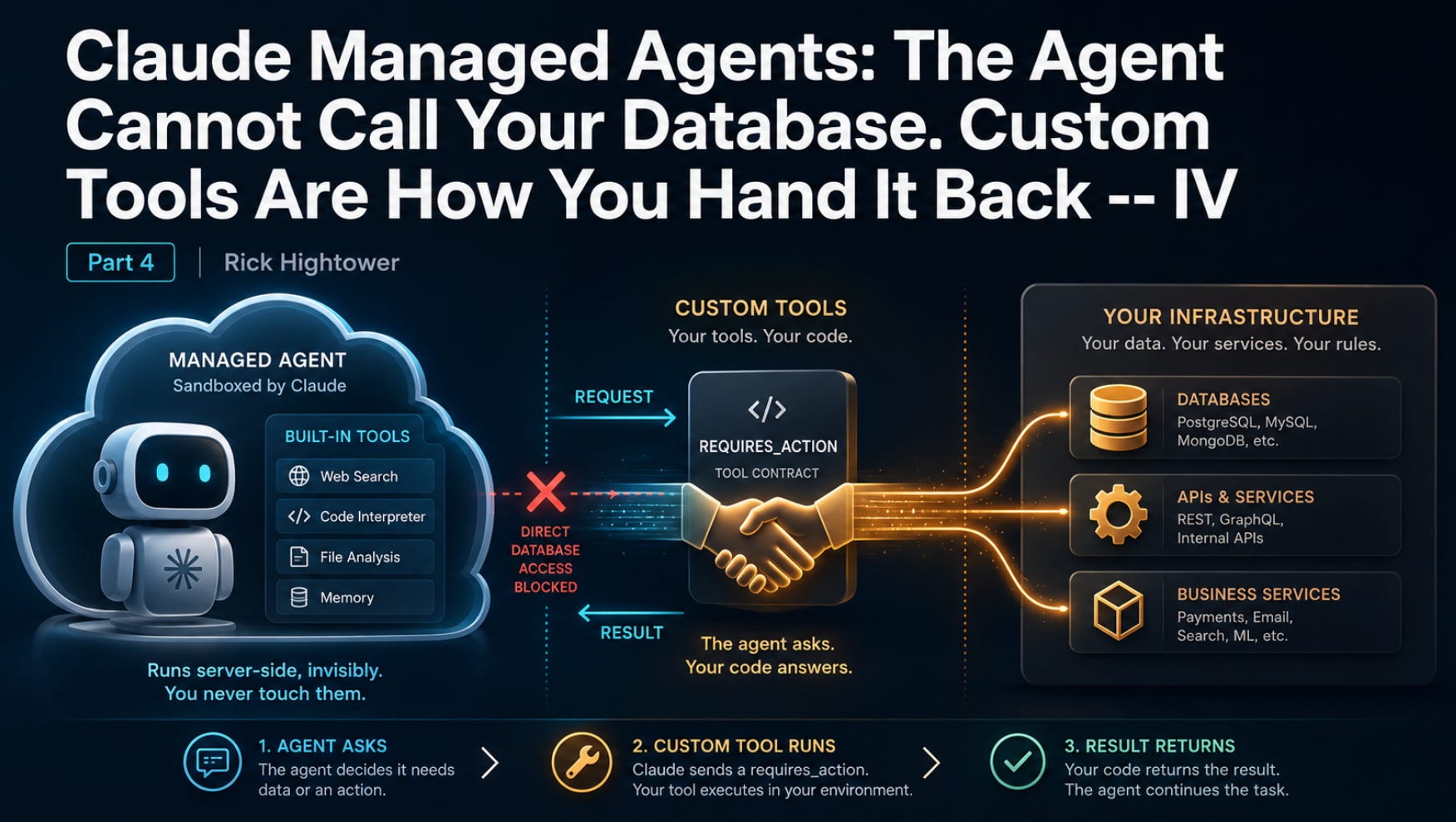
Your powerful Claude managed agent hums along perfectly until it needs to access your real database, internal APIs, or production systems, and then slams into an invisible wall.
That gut-wrenching moment of helplessness ends here. Discover how custom tools flip the script, letting the agent hand you a precise request so your code can answer instantly and turn your agent into a true production powerhouse.
In this article, you will learn how custom tools let a Claude-managed agent reach data and services that live in your own infrastructure, not its sandbox. We cover the difference between server-side built-in tools and client-side custom tools; how to declare a tool as a name-plus-schema contract; the four-step requires_action handshake that drives the request and result; the two failure modes that bite everyone first; and why the permission system deliberately does not touch any of this.
Part 4 of “Building with Claude Managed Agents,” a 13-part guide to building production-ready AI agents.
Built-in tools run server-side, invisibly, and you never touch them. Custom tools invert that completely: the agent asks, your code answers. Here is the request-result handshake that connects a managed agent to your own systems.
Your invoice agent can read files, run shell commands, and search the web, all without you writing a single line of execution code. The pre-built toolset runs inside the managed container, and the harness handles every detail. It feels almost magical until the moment your agent needs something real.
That moment arrives fast. The agent needs the vendor record behind your internal API. The customer tier in your production database. The rate from a pricing service that only answers requests from inside your network. None of that data is in the sandbox. It is in your application, behind your auth, on your network. And the managed container has no way to reach it.
Claude custom tools are the bridge across that gap. They invert the entire model you have been using with the built-in toolset. Instead of the agent running a tool and reporting back what it did, the agent describes what it wants, hands the request to you, and waits. Your code runs the operation against your own systems and feeds the answer back. The model never executes anything itself. It emits a structured request, your code does the work, and the result flows into the conversation so the agent can keep going.
If that pause-and-wait shape sounds familiar, it should. This is the requires_action branch in the agent event stream, the one most tutorials mention and never actually wire up. This article wires it up. Code is shown in Python and TypeScript.
Two kinds of tool, two opposite execution stories
It is worth being precise about the split, because it is the whole concept.
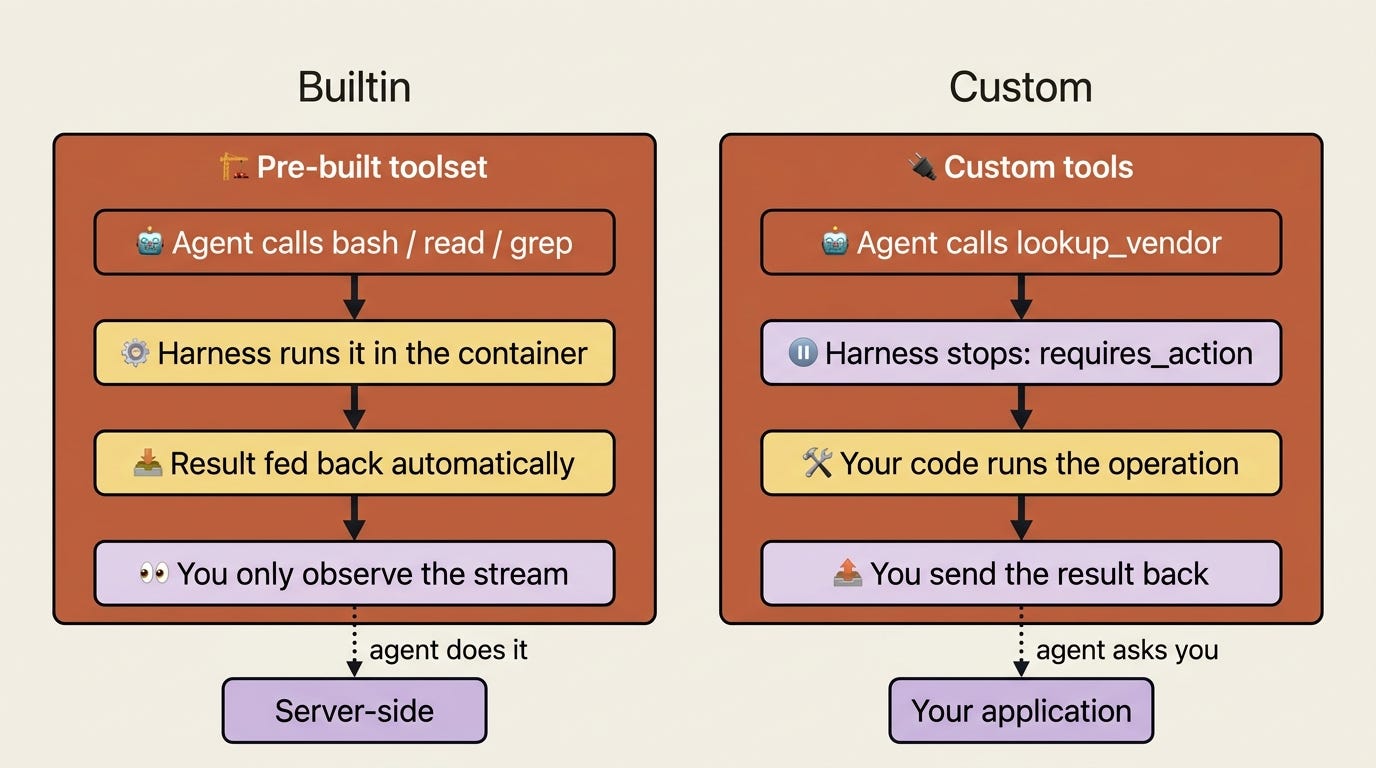
The pre-built toolset, bash, read, write, edit, glob, grep, web_fetch, and web_search, executes server-side. When the agent calls bash, the harness runs it in the container, captures the result, and feeds it back, all without involving your application at all. You see agent.tool_use and agent.tool_result flow past on the stream as a courtesy, but you are an observer, not a participant. The agent does the work; you watch.
Custom tools are the mirror image. The harness cannot run them, because the logic lives in your code and reaches systems only you can reach. So when the agent calls a custom tool, the harness stops and asks you to run it. You are now a participant, and the session cannot move until you respond.
Same agent, same event stream, opposite division of labor. The pre-built tools are something the agent does. Custom tools are something the agent asks you to do.
Declaring a custom tool: a name-plus-schema contract
A custom tool is a contract. You give it three things: a name, a description that tells the agent when to reach for it, and an input_schema, which is a JSON Schema describing the arguments. The agent reads the description to decide when the tool applies, and it uses the schema to shape its request.
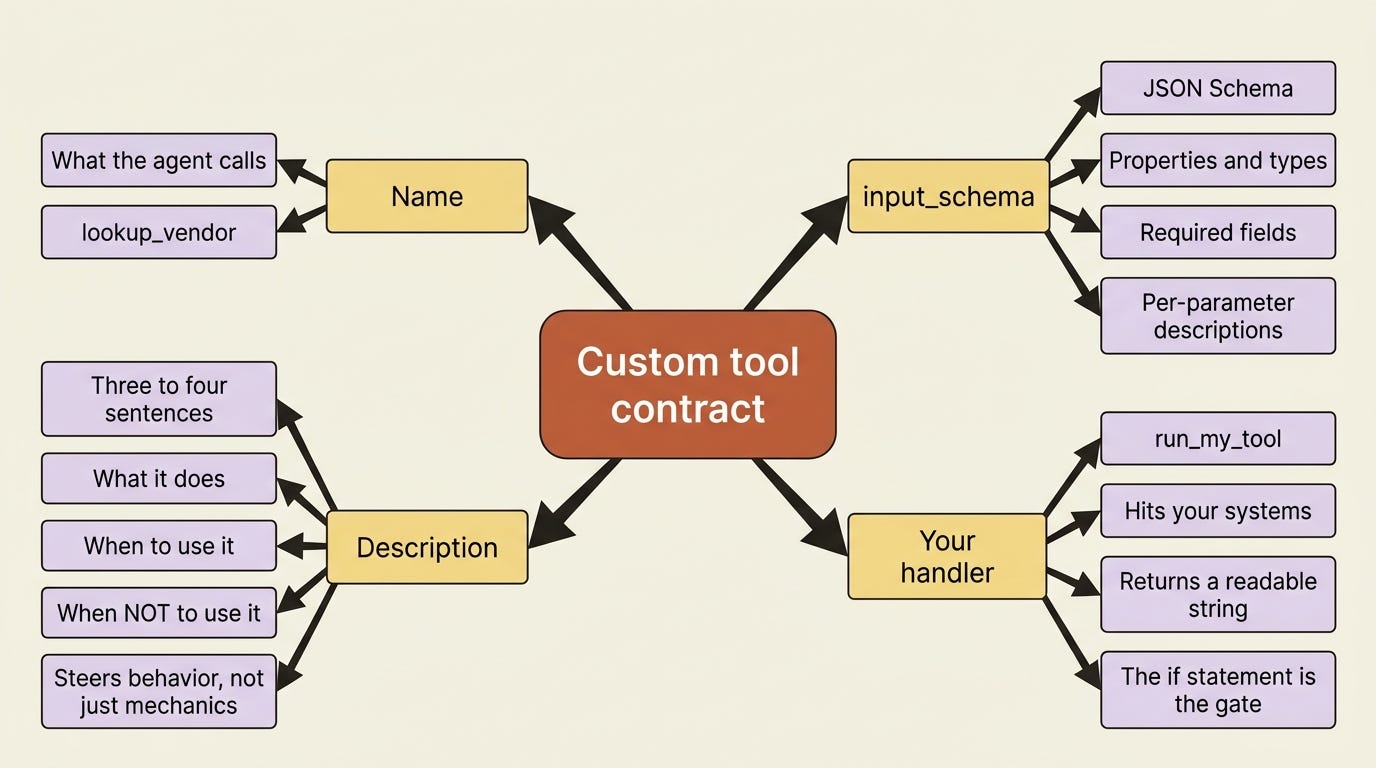
For the invoice agent, the obvious gap is vendor data. The agent can read an invoice file, but the canonical vendor record, the approved billing address, the payment terms, and the tax ID live behind your internal API. So you give it a lookup_vendor tool. You declare it alongside the pre-built toolset when you create the agent. In Python:
agent = client.beta.agents.create(
    name="Invoice Reconciler",
    model="claude-opus-4-7",
    system=(
        "You are an invoice-reconciliation agent. When an invoice references a "
        "vendor, use the lookup_vendor tool to fetch the canonical vendor record "
        "before trusting the values printed on the invoice."
    ),
    tools=[
        {"type": "agent_toolset_20260401"},
        {
            "type": "custom",
            "name": "lookup_vendor",
            "description": (
                "Fetch the canonical vendor record from the internal billing "
                "system by vendor ID. Returns the approved billing address, "
                "payment terms, and tax ID. Use this whenever you need to verify "
                "details printed on an invoice against the system of record. Do "
                "not guess vendor details; always look them up."
            ),
            "input_schema": {
                "type": "object",
                "properties": {
                    "vendor_id": {
                        "type": "string",
                        "description": "The vendor's internal ID, e.g. 'vnd_8841'.",
                    },
                },
                "required": ["vendor_id"],
            },
        },
    ],
)
And in TypeScript:
const agent = await client.beta.agents.create({
  name: "Invoice Reconciler",
  model: "claude-opus-4-7",
  system:
    "You are an invoice-reconciliation agent. When an invoice references a " +
    "vendor, use the lookup_vendor tool to fetch the canonical vendor record " +
    "before trusting the values printed on the invoice.",
  tools: [
    { type: "agent_toolset_20260401" },
    {
      type: "custom",
      name: "lookup_vendor",
      description:
        "Fetch the canonical vendor record from the internal billing system by " +
        "vendor ID. Returns the approved billing address, payment terms, and tax " +
        "ID. Use this whenever you need to verify details printed on an invoice " +
        "against the system of record. Do not guess vendor details; always look them up.",
      input_schema: {
        type: "object",
        properties: {
          vendor_id: { type: "string", description: "The vendor's internal ID, e.g. 'vnd_8841'." },
        },
        required: ["vendor_id"],
      },
    },
  ],
});
This description is doing more work than it looks. The single biggest factor in whether the agent uses a custom tool well is how thoroughly you describe it. Aim for three or four sentences minimum. Explain what the tool does, when to use it, when not to, what each parameter means, and any caveats. The agent has nothing to go on but the words you write, so a vague description produces a tool the agent ignores or misuses.
If you are a paid subscriber, thank you. Your support makes this work possible.
If you are a free subscriber and find these articles useful, please consider upgrading. A paid subscription is $80 per year or $8 per month.
Free subscribers typically receive access to the full versions of paid articles after one to two months.
