
Anthropic’s Claude Certified Architect Exam (CCA-F) - Agent SDK Patterns: Stop Writing the Agent Loop. Start Engineering the Tools. I
Part 1: The Claude Agent SDK runs the loop for you. That single fact moves the real work somewhere most developers do not look: into the tools you hand it and the errors they return.

Anthropic’s Claude Certified Architect Exam (CCA-F): Stop Writing the Agent Loop. Start Engineering the Tools.
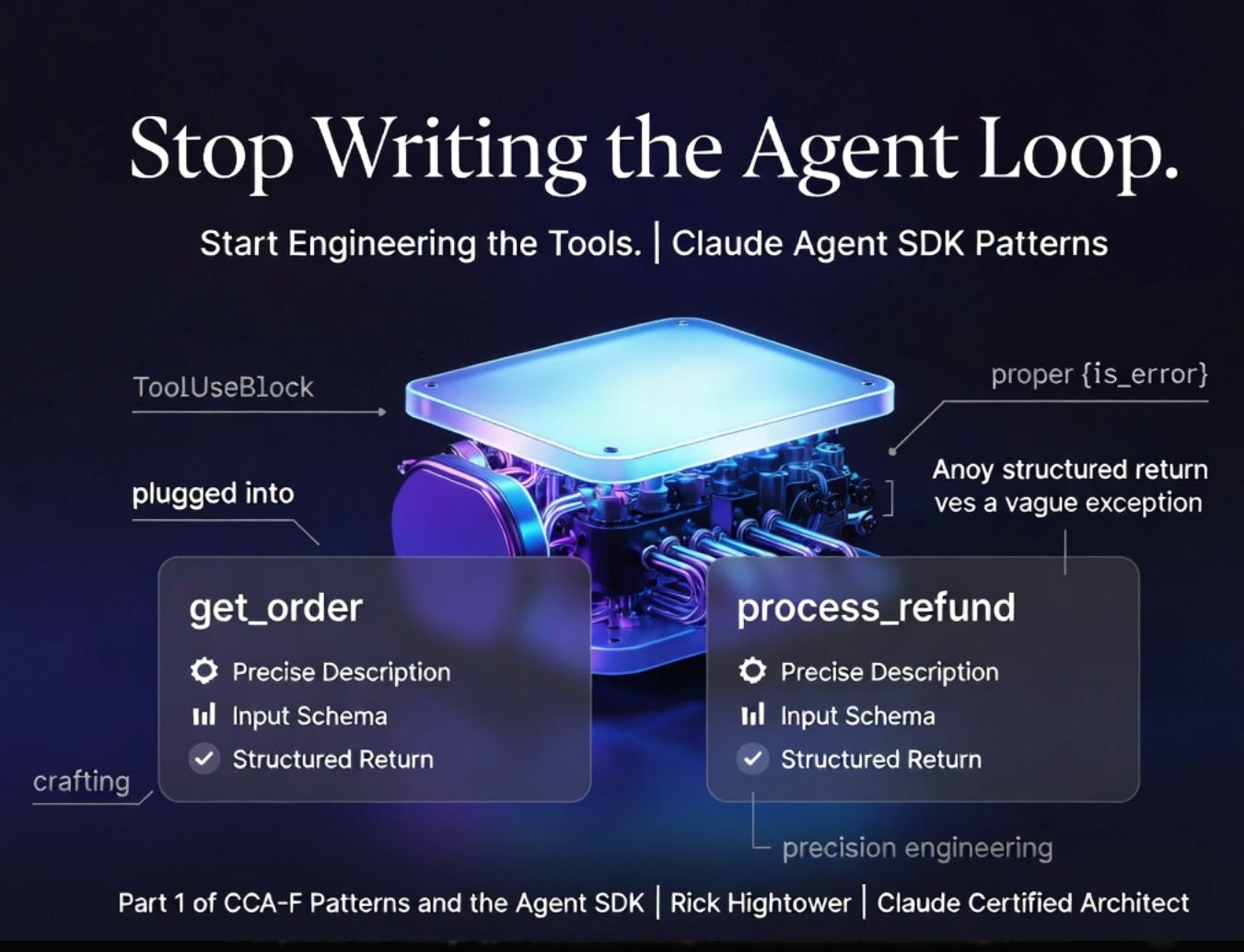
Ship enough agents, and you learn the loop was never the hard part. Reliability lives in the tools you hand the SDK and the structured errors they hand back.
In this article, you will build the base of a customer support refund agent on the Python Claude Agent SDK. You will see the agent loop the SDK now runs for you, learn to read it through four message types, define two custom tools with the
@tooldecorator, wire them into a multi-turn conversation, and write the structured error contract that keeps an agent honest when a tool fails. By the end, you will have a working agent loop with two legible tools, and a clear sense of where reliability actually lives.
Part 1 of “CCA-F Patterns and the Agent SDK,” a 4-part, code-first guide that builds the certification’s patterns on the Python Claude Agent SDK.
If you studied the agent loop the classic way, you learned to drive it by hand. Call the model. Read the stop_reason. If it says "tool_use", run the tool, append the result, and call it again. If it says end_turn, stop. It is a tidy little state machine, and learning to write it correctly felt like the core skill.
Then the Claude Agent SDK quietly took that job away. You no longer write the loop. You hand the SDK a prompt and your tools, and it runs the whole tool-use cycle internally, streaming messages back to you as they happen. The mechanic you worked hard to master is now a single function call.
This is where most people put their effort in the wrong place. They keep optimizing the part the SDK already owns and neglect the part that now decides everything: the tools. The tool’s input schema is how the model routes. The tool’s return value, including whether it flags an error, determines how the agent recovers. That is where reliability lives now. This article builds the foundation for a runaway refund agent to show you exactly that shift, anchored in the Python claude-agent-sdk package and verified against version 0.2.x. The code is close to runnable; you can wire in your own data layer where the comments indicate.
The loop you no longer write
In the raw Messages API, you ran the loop yourself: call messages.create, branch on stop_reason, execute any tool_use blocks, append the tool_result in a user turn, and repeat until end_turn. The Agent SDK collapses all of that into a single call. You hand it a prompt and your tools; it runs the tool-use loop internally and streams messages to you as they happen.
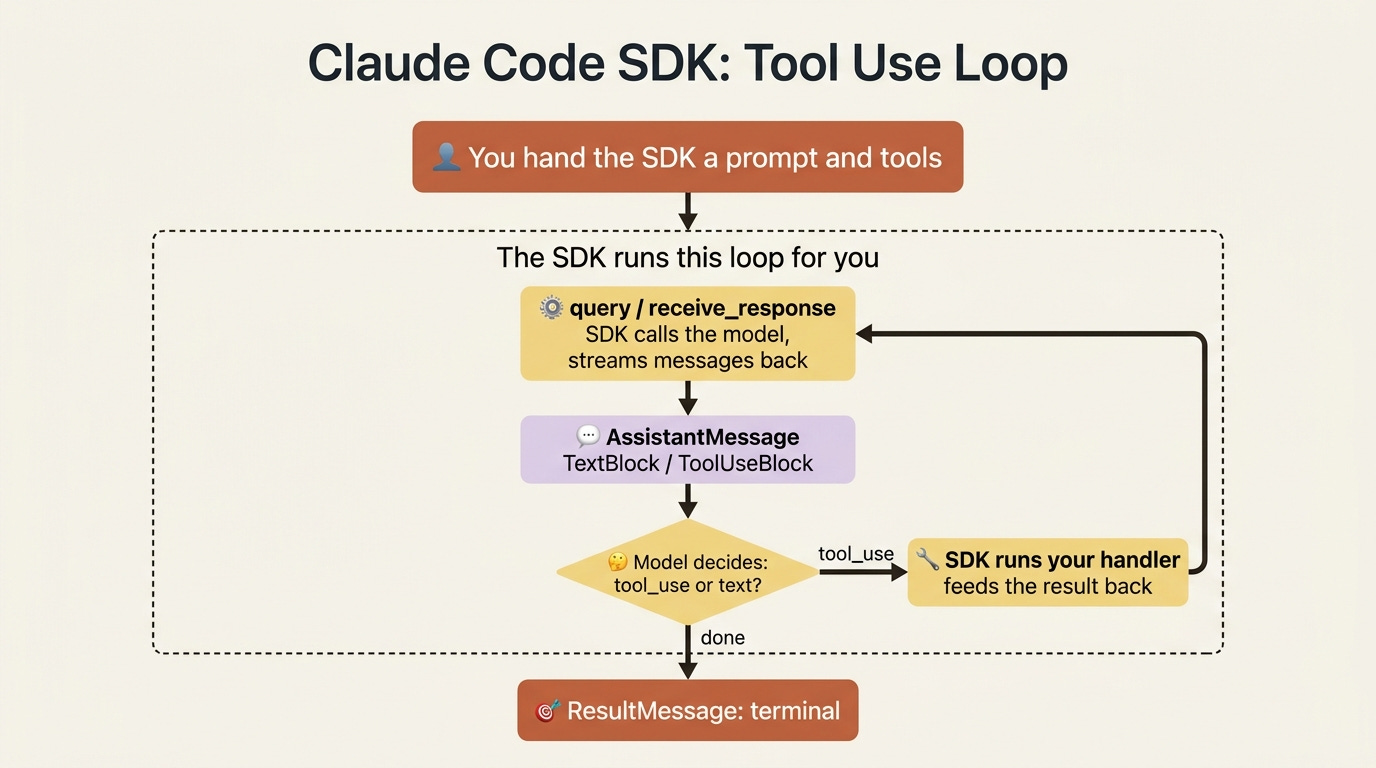
The simplest form is query, a one-shot async iterator. You iterate the messages it yields, pick out the assistant’s text, and stop when the ResultMessage arrives.
import anyio
from claude_agent_sdk import query, AssistantMessage, TextBlock, ResultMessage

async def main():
    async for message in query(prompt=”Summarize the refund policy in two sentences.”):  # ①
        if isinstance(message, AssistantMessage):  # ②
            for block in message.content:
                if isinstance(block, TextBlock):  # ③
                    print(block.text)
        elif isinstance(message, ResultMessage):  # ④
            # The loop is done. ResultMessage is the terminal message.
            break

anyio.run(main)
① query is the data-plane loop surface: a single call that runs the tool-use loop internally and yields messages as an async iterator, so you read it rather than drive it. ② Each message is dispatched by type; an AssistantMessage carries the model’s output as a list of content blocks. ③ A TextBlock is the assistant’s prose; you pull .text out of it for display. ④ The ResultMessage is the terminal message, so observing it is your signal to stop iterating.
Note: The full extracted listing at code/cca-f-agent-sdk-patterns/part-1-the-loop-and-the-tools/listings/01-query-loop.py shows the runnable form.
The message types are the vocabulary you read the loop with. An AssistantMessage carries a content list of blocks. A TextBlock has .text. A ToolUseBlock has .name, .input, and .id, and it shows you when the model decided to call one of your tools. A ResultMessage is the terminal message, with the final .result text and a .subtype such as "success". You never inspect stop_reason here; the SDK already acted on it.
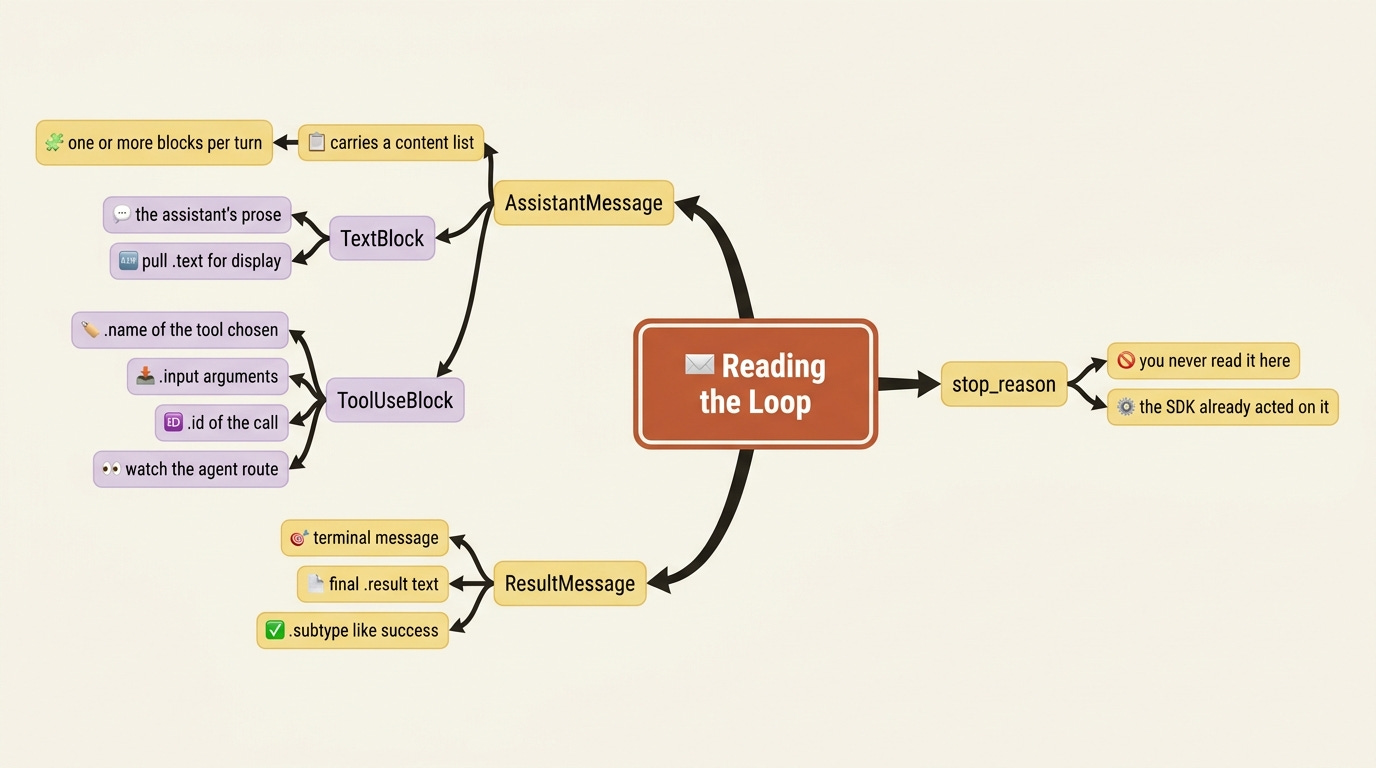
There is a subtlety worth holding onto. The fact that you no longer read stop_reason does not mean the concept disappeared. The architecture underneath is still “continue on tool_use, terminate on end_turn.” The SDK does not erase that knowledge; it relies on it. When someone asks how the loop ends, the honest answer is still the stop reason, even though your production code never touches it directly. You graduated from driving the loop to reading it.
A custom tool is a function plus a schema
The agent can only do what its tools allow. In the Agent SDK, you define a tool with the @tool decorator, which takes a name, a description, and an input schema, and you bundle one or more tools into an in-process MCP server with create_sdk_mcp_server. The handler is an async function that returns a content list, in exactly the shape the model receives.
from typing import Any
from claude_agent_sdk import tool, create_sdk_mcp_server

@tool(
    “get_order”,
    “Look up an order by its ID. Returns status, total, and refund eligibility.”,  # ①
    {”order_id”: str},  # ②
)
async def get_order(args: dict[str, Any]) -> dict[str, Any]:  # ③
    order = await order_service.fetch(args[“order_id”])   # your data layer  ④
    return {“content”: [{“type”: “text”, “text”: f”Order {order.id}: {order.status}, ${order.total}”}]}  # ⑤

refund_server = create_sdk_mcp_server(
    name=”refunds”,
    version=”1.0.0”,
    tools=[get_order],  # ⑥
)
① The description is the routing signal: the model reads it to decide when to call the tool, so it must be specific. ② The input schema, here a dict mapping argument names to types, tells the model the call’s shape; the SDK converts it to JSON Schema. ③ The handler is an async function receiving the parsed arguments as a dict. ④ This is where your own data layer fetches the order; everything else is SDK plumbing. ⑤ The return is a content list, the exact shape the model receives back as the tool result. ⑥ create_sdk_mcp_server bundles the tool functions into an in-process MCP server you can wire into the loop.
Note: The full extracted listing at code/cca-f-agent-sdk-patterns/part-1-the-loop-and-the-tools/listings/02-get-order-tool.py shows the runnable form.
The description is not decoration. It is the routing signal: the model reads it to decide when to call the tool, so a vague description is a misrouting bug waiting to happen. The input schema in Python is a dict mapping argument names to types, which the SDK converts to JSON Schema. When you need enums, nullable fields, or optional arguments, you pass a full JSON Schema dict instead.
If you are a paid subscriber, thank you. Your support makes this work possible.
If you are a free subscriber and find these articles useful, please consider upgrading. A paid subscription is $80 per year or $8 per month.
Wiring tools into the loop and running a conversation
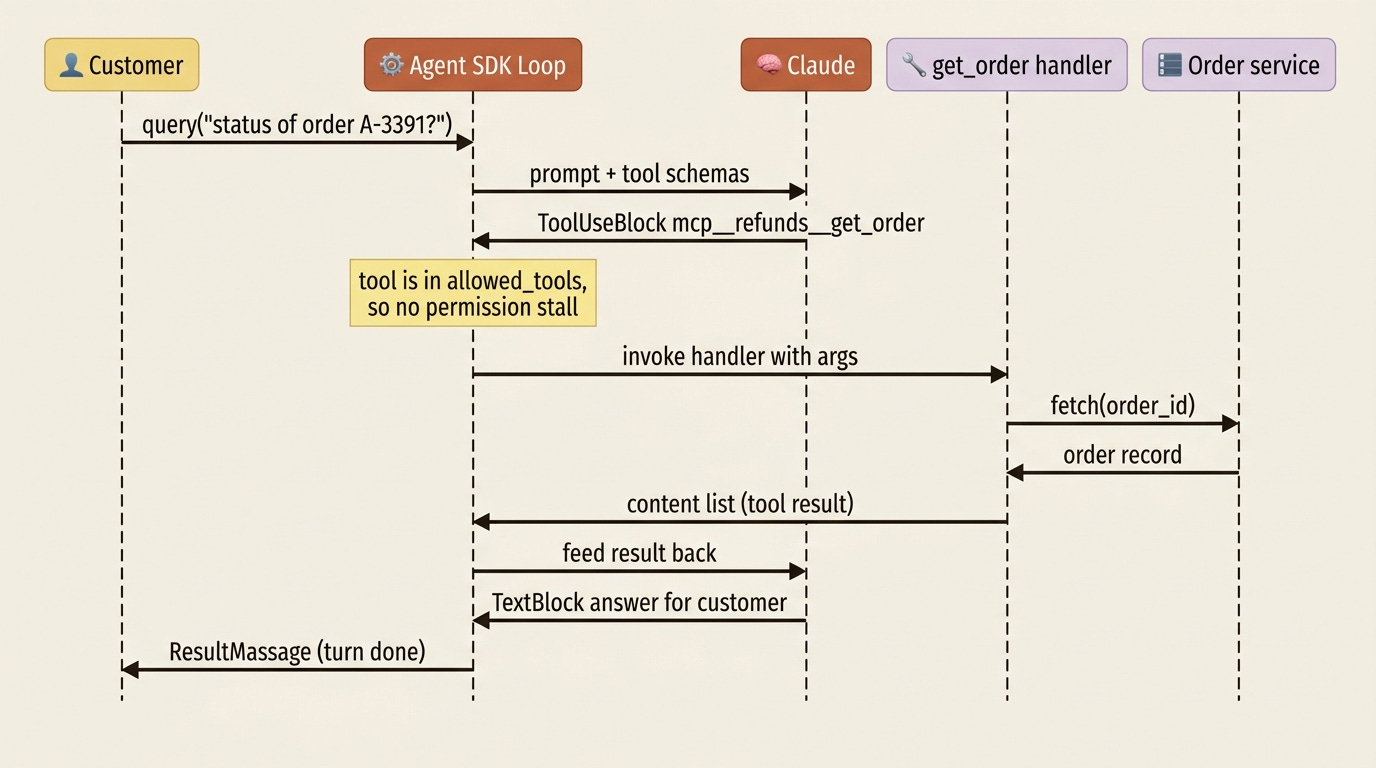
Tools do nothing until you pass the server into ClaudeAgentOptions and allow the tool by its fully qualified name. The name follows the pattern mcp__{server}__{tool}, so get_order on the refunds server is mcp__refunds__get_order. Listing it in allowed_tools automatically approves it, so the run does not stall on a permission prompt.
For a real agent, you want a multi-turn conversation, which ClaudeSDKClient provides. It is an async context manager: you connect, then query and receive_response per turn. receive_response yields messages until the ResultMessage for that turn is received.
import anyio
from claude_agent_sdk import (
    ClaudeSDKClient, ClaudeAgentOptions,
    AssistantMessage, TextBlock, ToolUseBlock, ResultMessage,
)

options = ClaudeAgentOptions(
    mcp_servers={“refunds”: refund_server},  # ①
    allowed_tools=[“mcp__refunds__get_order”],  # ②
    system_prompt=”You are a customer support agent who looks up orders and explains their status.”,
    model=”claude-sonnet-4-6”,
)

async def main():
    async with ClaudeSDKClient(options=options) as client:  # ③
        await client.query(“What is the status of order A-3391?”)  # ④
        async for message in client.receive_response():  # ⑤
            if isinstance(message, AssistantMessage):
                for block in message.content:
                    if isinstance(block, ToolUseBlock):  # ⑥
                        print(f”[tool call] {block.name}({block.input})”)
                    elif isinstance(block, TextBlock):
                        print(block.text)
            elif isinstance(message, ResultMessage):
                break

anyio.run(main)
① The server is registered under a name in mcp_servers, which is the {server} half of every tool’s fully qualified name. ② allowed_tools auto-approves the tool by its mcp__{server}__{tool} name so the run does not stall on a permission prompt. ③ ClaudeSDKClient is an async context manager; entering it connects the client for a multi-turn conversation. ④ query sends one user turn into the conversation. ⑤ receive_response yields the messages for that turn until its ResultMessage. ⑥ Printing the ToolUseBlock is how you watch the agent route, observing which tool it chose and with what input.
Note: The full extracted listing at code/cca-f-agent-sdk-patterns/part-1-the-loop-and-the-tools/listings/03-client-conversation.py shows the runnable form.
Printing the ToolUseBlock is how you watch the agent route. You will see it choose mcp__refunds__get_order, the SDK will run your handler, feed the result back, and the assistant’s final TextBlock will answer the customer. That is the whole loop, and you wrote none of it.
Make the tool fail legibly
Here is the part that separates a demo from a system. When a tool fails, the handler must return a structured error rather than throw, because returning keeps the agent loop alive so the model can react, while an uncaught exception ends the run. In the Python in-process server the handler return forwards content and is_error, so you carry the machine-readable contract as JSON inside the content and set is_error to mark it as a failure.
The error must also distinguish two outcomes that the careless tool collapses into one: the call failed because the source was unreachable, versus the call succeeded and found nothing. The first is an error. The second is a legitimately empty result. A tool that treats them the same teaches the model to mistrust silence and to retry things it should report.
import json
from typing import Any
from claude_agent_sdk import tool

@tool(”get_order”, “Look up an order by its ID”, {”order_id”: str})
async def get_order(args: dict[str, Any]) -> dict[str, Any]:
    try:
        order = await order_service.fetch(args[“order_id”])  # ①
    except TimeoutError:
        # The source was unreachable. This is an ERROR, not an empty result.
        return {
            “content”: [{“type”: “text”, “text”: json.dumps({
                “errorCategory”: “upstream_timeout”,  # ②
                “isRetryable”: True,
                “query”: args[“order_id”],
                “message”: “Order service timed out; status is unknown, not empty.”,
            })}],
            “is_error”: True,  # ③
        }
    if order is None:
        # The call SUCCEEDED and found nothing. Not an error.
        return {“content”: [{“type”: “text”, “text”: json.dumps({“found”: False})}]}  # ④
    return {“content”: [{“type”: “text”, “text”: json.dumps({
        “found”: True, “order_id”: order.id, “status”: order.status, “total_usd”: order.total,  # ⑤
        “refund_eligible”: order.refund_eligible,
    })}]}
① The fetch is wrapped in try so a transport failure becomes a structured return, not a thrown exception that would end the run. ② On failure, the contract is machine-readable JSON: a category and a retry flag the model can act on, not an opaque “operation failed.” ③ Setting is_error: True marks the result as a failure while keeping the loop alive so the model can react. ④ A successful call that found nothing returns a clean, error-free result; found: False is data, not a failure. ⑤ The found case returns the order fields the agent needs, again error-free.
Note: The full extracted listing at code/cca-f-agent-sdk-patterns/part-1-the-loop-and-the-tools/listings/04-legible-error-tool.py shows the runnable form.
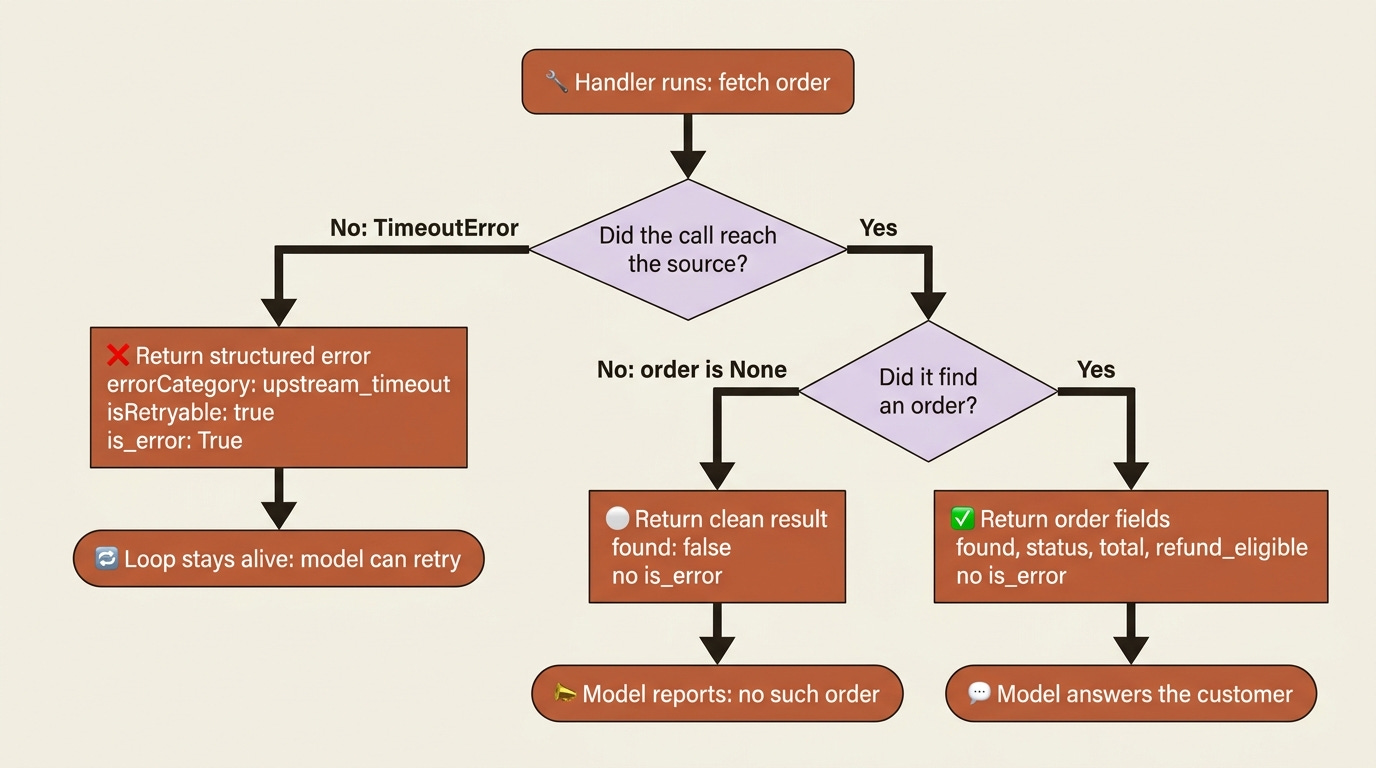
Now the agent can tell a transient timeout it should retry apart from a permanent “no such order” it should report. A model handed "Operation failed." has no such handle, and that flat string is exactly the kind of lie that sinks an agent in production: it cannot tell whether to retry, escalate, or move on.
The trap to watch for is a handler that catches everything and returns a normal content block with no is_error. It looks safe. It is the opposite. The correct design returns is_error: True on the unreachable case and reserves the clean, error-free return for the genuinely empty result. The difference is one boolean, and it is the difference between an agent that recovers and one that confidently reports nonsense.
The base agent, assembled
Add a second tool, process_refund, and you have the spine of the refund agent. It is intentionally ungated here. The refund-limit guarantee belongs at the tool boundary, enforced by a hook, not buried inside this tool or hoped for in the prompt.
@tool(”process_refund”, “Issue a refund for an order”, {”order_id”: str, “amount_usd”: float})  # ①
async def process_refund(args: dict[str, Any]) -> dict[str, Any]:
    await ledger.issue_refund(args[“order_id”], args[“amount_usd”])  # ②
    return {“content”: [{“type”: “text”, “text”: json.dumps({“refunded_usd”: args[“amount_usd”]})}]}

refund_server = create_sdk_mcp_server(name=”refunds”, version=”1.0.0”,
                                      tools=[get_order, process_refund])  # ③

options = ClaudeAgentOptions(
    mcp_servers={“refunds”: refund_server},
    allowed_tools=[“mcp__refunds__get_order”, “mcp__refunds__process_refund”],  # ④
    system_prompt=”You are a customer support agent. Look up orders and issue refunds when warranted.”,
    model=”claude-sonnet-4-6”,
)
① The second tool takes a typed two-argument schema; the amount_usd: float shows non-string types in the dict-schema form. ② The handler writes to your ledger; it is deliberately ungated, the refund-limit check is deferred to a hook. ③ Both tool functions are bundled into the one refunds server. ④ Both tools are allowed by their fully qualified mcp__refunds__... names so neither stalls on a permission prompt.
Do this today
Install and authenticate. Run
pip install claude-agent-sdk. The SDK drives the Claude Code CLI under the hood, so you authenticate the same way: eitherclaude loginfor subscription auth, orexport ANTHROPIC_API_KEY=sk-...in your environment.Run the
queryloop first. Paste the one-shot example, run it, and watch the messages stream. Confirm you stop on theResultMessageand never look atstop_reason.Build one tool with a sharp description. Define
get_orderwith@tool, serve it withcreate_sdk_mcp_server, and wire it throughClaudeAgentOptions. Print everyToolUseBlockso you can watch the agent route.Write the legible error path. Add the
try/except TimeoutErrorbranch that returnsis_error: True, and the separatefound: Falsebranch that does not. Force a timeout and confirm the loop survives it.Resist gating the refund inside the tool. Leave
process_refundungated for now. The limit belongs in a hook at the tool boundary, where it cannot be argued out of by a clever prompt.
Where reliability actually lives
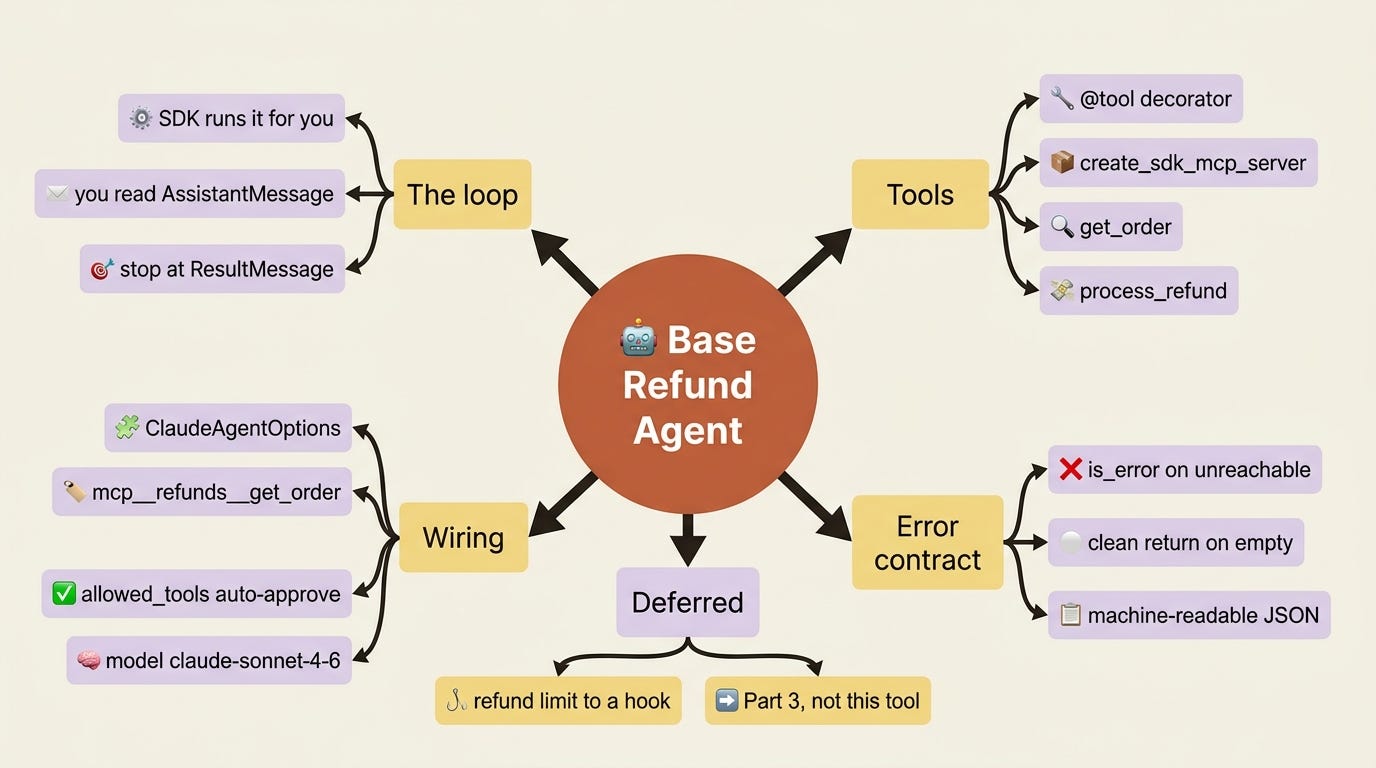
You now have the base of the refund agent on the Agent SDK: a loop the SDK runs, two tools defined with @tool and served from create_sdk_mcp_server, wired through ClaudeAgentOptions and addressed as mcp__refunds__..., and a structured error contract that keeps an unreachable source distinct from an empty result. You read the loop through AssistantMessage, ToolUseBlock, TextBlock, and ResultMessage, and you never touched stop_reason, because the SDK did.
The lesson underneath the code is the one to carry forward. When a framework takes over the loop, it does not remove the engineering; it relocates it. The reliability you used to win by writing a careful state machine you now win by writing careful tools: a description precise enough to route on, a schema the model can fill, and a return value that tells the truth about whether something failed. Put your effort there.
The agent works, but it does everything within a single context. When a support case needs research that would bloat that context, or a risky step that needs isolation, you reach for subagents. That is where this series goes next.
This is Part 1 of “CCA-F Patterns and the Agent SDK,” a 4-part, code-first guide that builds the certification’s patterns on the Python Claude Agent SDK.
If this helped you, please consider subscribing to my Substack newsletter.
Likes, comments, and shares really do make a difference. They help grow the channel, support the work, and get these ideas in front of more builders who are trying to understand AI agents, harness engineering, and production AI systems.
Thank you for reading and for helping the work reach more people.
If you are a paid subscriber, thank you. Your support makes this work possible.
If you are a free subscriber and find these articles useful, please consider upgrading. A paid subscription is $80 per year or $8 per month.
Free subscribers typically receive access to the full versions of paid articles after one to two months.
About the Author — Claude Certified Architect
Rick Hightower is a former Senior Distinguished Engineer at a Fortune 100 company, focusing on delivering ML / AI insights to front-line applications, and a practitioner building multi-agent production systems. Follow him on SubStack and Medium for more hands-on agent engineering content. You can also book him to speak and train your team: Check out Rick Hightower’s SpeakerHub.

Rick Hightower helps companies become AI-first through practical mentoring, executive and team training, and custom AI solution development. He is a former Senior Distinguished Engineer at a Fortune 100 company, where he focused on bringing ML and AI insights into real front-line business applications.
Subscribe to Rick’s newsletter to see videos and guides.
Rick is a Claude Certified Architect, AI systems practitioner, and builder of production multi-agent systems. He is currently working on authoring a book on Harness Engineering with Manning Publishing. He created Skilz, a universal agent skill installer supporting 30+ coding agents, including Claude Code, Gemini, Copilot, and Cursor, and co-founded one of the largest agentic skill marketplaces.
Today, Rick and the Spillwave team work with leaders and teams who want to move beyond AI experiments and build real AI capability inside their companies. He helps organizations adopt AI safely, train their people, redesign workflows, and build practical AI systems that create measurable business value.
Ready to make your company AI-first? Connect with Rick on LinkedIn, Substack, or Medium, book him to speak or train your team, or visit Spillwave to explore mentoring, training, and custom AI solutions for your organization.